
How to Give AI Agents a Bash Terminal Without Docker or VMs
What if the most useful tool you could give an AI agent is one it already knows by heart?
Patrick Frenet (1Pi.now) recently shipped an open-source project called Convex Sandbox that takes that idea seriously. It gives an AI coding assistant a real, stateful bash terminal and a virtual file system — with no Docker, no VMs, and no container orchestration in sight. Just a Node action, a clever bash interpreter, and Convex storage doing the persistence work.
If you've been hunting for a lighter way to wire shell access into your agent stack, this one is worth a close look.
TL;DR: A Stateful Bash Sandbox for AI Agents, Backed by Convex
Convex Sandbox is a persistent bash environment for AI agents that runs on Convex using the just-bash project. There's no Docker, no VM, and no container. File system state lives in Convex storage between commands, giving agents a machine-like experience without any of the infrastructure weight.
In four bullets:
- What it is: a virtual bash terminal and file system for AI agents, running entirely inside a Convex node action.
- What it replaces: Docker containers, VM-based sandboxes, and any bespoke
readFile/writeFile/listFilestools you'd otherwise hand-roll. - Who it's for: developers building agentic workflows on Convex who want their AI coding assistant to use bash as its tool surface.
- Where the repo lives: github.com/wantpinow/convex-sandbox
Why Agents Want a Real Bash Terminal, Not Custom Tools
Large language models have read a staggering amount of bash. They know ls, cat, grep, sed, pipes, redirection, and the difference between cp and mv better than they know whatever JSON tool schema you're about to invent.
So when you build a custom listFiles tool, then a readFile tool, then a writeFile tool, then a searchFiles tool, you're doing two things at once: reinventing the wheel, and forcing the model to learn your wheel instead of using the one it already knows. The result is usually worse tool calls and more glue code on your end.
A bash terminal flips that. One tool, infinite composability. The agent can chain commands, redirect output, and inspect the file system the same way a developer would. It can pipe ls into grep, redirect cat into a new file, and run a quick sed substitution without you having to anticipate any of those operations in your tool schema.
There's a quieter benefit, too. Every custom tool you ship is another contract you have to version, document, and explain to the model in your system prompt. Bash is essentially zero-cost context — the model already knows it. You don't burn tokens teaching it. You don't fix bugs in your writeFile schema. You just say "you have a bash terminal," and it gets to work.
How Convex Sandbox Works
Convex Sandbox combines three pieces:
- just-bash — a bash interpreter that runs inside a Node process with a virtual in-memory file system.
- Convex storage — persists files between commands so the sandbox is stateful across invocations.
- A Convex node action — orchestrates each command execution, wires up the file system, and writes changes back.
The whole thing is small enough that you can read the source in an afternoon and have a clear mental model of every layer.
just-bash: A Bash Interpreter Inside Node
just-bash is exactly what it sounds like: a bash interpreter written to run inside a Node.js process. It doesn't shell out to your machine. It doesn't need a real /bin/bash. It executes bash semantics in-process, which is what makes the no-VM, no-container story possible.
Most "give your agent a shell" stories start with "first, spin up a container." Then comes the orchestration: pulling images, managing lifecycles, cleaning up zombies, billing for idle time. just-bash skips that entire layer because the shell is a library you import.
Convex Storage as the Persistence Layer
A bash session without state isn't very useful. If echo "hi" > note.txt evaporates the moment your action returns, your agent is just yelling into the void.
Convex Sandbox solves this by treating Convex storage as the disk. File contents live in storage. File metadata (paths, sizes, sandbox IDs) lives in regular Convex tables. When a command runs, the action loads the relevant files, executes the command, then writes any changes back. The next command picks up exactly where the last one left off.
That split — contents in storage, metadata in tables — is what makes the lazy-loading optimization possible. You can list a thousand files cheaply because you're only touching a metadata index, and you only pay the storage read cost for files the command actually touches.
The Shared-State Model for Humans and Agents
Because Convex is reactive by default, every client subscribed to the sandbox sees the same file system in real time. No websockets to plumb. No cache invalidation to debug. No "does my UI need to refetch on focus?" decisions to second-guess.
Open two browser tabs on the same sandbox, ask the agent to create a file in one, and watch it appear in the other instantly. Multiple agents can collaborate on the same sandbox the same way. The reactivity is just there.
A Walk Through the Demo
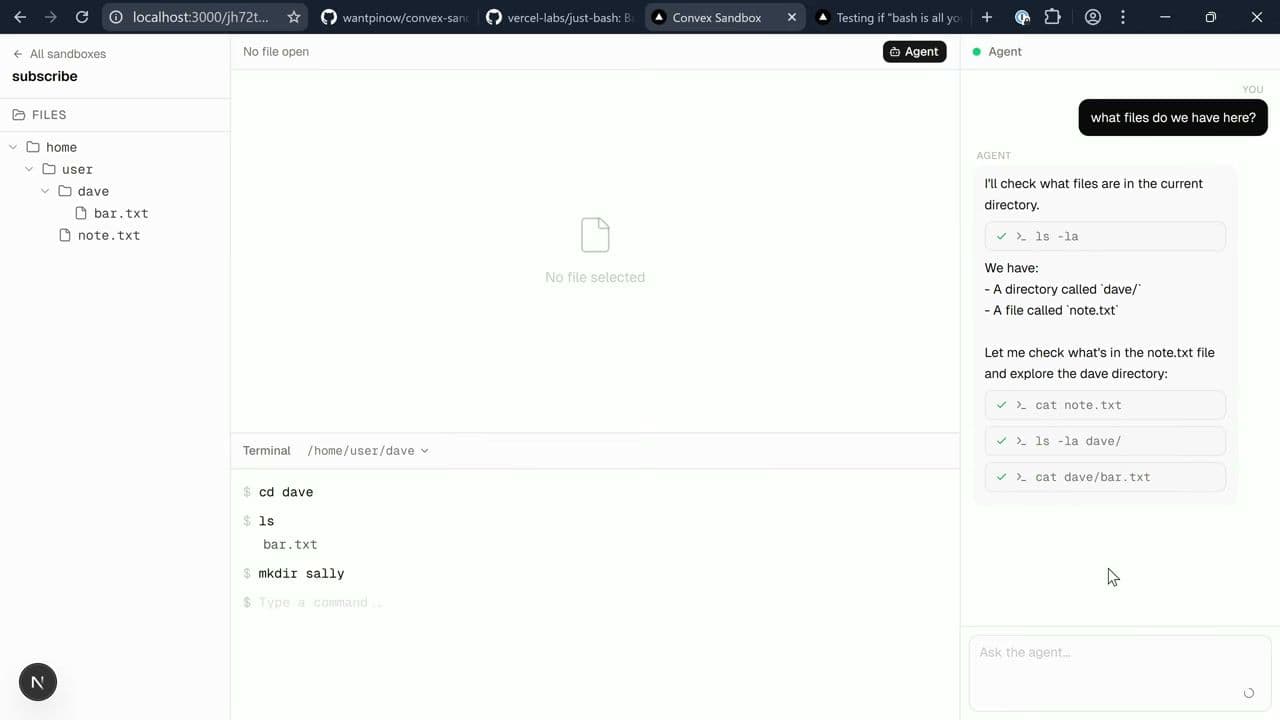
The Convex Sandbox demo is built around a small UI: a terminal, a file browser, and a chat panel pointed at an agent.
Creating a Sandbox and Running Your First Commands
You spin up a new sandbox and get a fresh working directory. From there it behaves like a bash terminal:
1pwd
2echo "Hello from Convex Sandbox" > note.txt
3cat note.txt
4cp note.txt copy.txt
5mv copy.txt renamed.txt
6ls
7
As you run those commands, files show up live in the file browser pane — no refresh, no manual sync. You're watching Convex storage update through reactive subscriptions.
Watching the Agent Use Bash as Its Tool Surface
Now hand the keyboard to the agent. Ask "What files do we have here?" — the agent runs ls. Ask it to create a few short stories — the agent runs echo and redirection. Ask it to read one back — it runs cat.
The thing to notice is what's not happening. There's no custom listFiles tool definition. No writeFile schema. No readFile JSON contract. The agent has exactly one tool (run a bash command) and composes everything else from there.
When you ask it to do something more involved, like "find all the stories that mention a dragon," it just pipes grep across the directory. No search tool needed.
Real-Time Sync Across Tabs (and Across Agents)
Open a second browser tab on the same sandbox. Ask the agent in the first tab to delete all the files. Watch the file browser empty out in both tabs at the same time.
Imagine the equivalent build on a container-based sandbox: you'd be wiring up a websocket server, a file watcher inside the container, a diff protocol, and probably a debounce strategy. Here, one Convex query replaces all of it.
Under the Covers: What the Code Actually Does
The Node Action and the "use node" Directive
just-bash needs Node primitives, so the sandbox runs inside a Convex node action:
1// convex/sandbox.ts
2"use node";
3
4import { action } from "./_generated/server";
5// ...
6
The "use node" directive tells Convex to run the function in the Node.js runtime instead of the default V8 isolate, unlocking any library that needs Node APIs.
Lazy-Loading File Contents from Convex Storage
Convex Sandbox hands just-bash a virtual file system where each file knows its metadata up front, but contents are loaded lazily through an async getter. The contents are only pulled from Convex storage the first time bash actually reads that file.
If your command is cat note.txt, only note.txt gets fetched. The other 999 files stay where they are.
Intercepting Node's File System APIs
just-bash exposes hooks that let the host wrap file system operations. Convex Sandbox uses those hooks to record every write, delete, and rename into a change-set. When the bash command finishes, the action flushes the change-set: new and modified files go to Convex storage, and deletions update the metadata table.
This also means the persistence layer is naturally transactional — you don't end up with half-written files if an action fails partway through.
The Current-Working-Directory Trick
Bash has a current working directory. After each command, the action captures the resulting cwd and stores it on the sandbox record. The next command resumes there. It's a bit of a hack, but it works — and the project is upfront about it.
For production, you'd likely want to extend this pattern to capture other session state: environment variables, shell options, aliases, history.
Where This Approach Shines (and Where It Doesn't)
Great for: Stateful Agentic Workflows
- Agent scratchpads where the model writes notes, drafts, and intermediate results to disk
- Document workflows: an agent organizing, transforming, and producing text artifacts
- Code-review agents that read files, search them, and write summaries back
- Multi-user collaborative agent sessions where humans and agents share one file system
- Research agents that need to hold context across many turns without blowing out the context window
Not Great for: Arbitrary Untrusted Code or Heavy Native Deps
- Running untrusted compiled binaries (no kernel-level isolation)
- GPU work or anything that needs hardware access
- Processes that fork heavily or spawn long-running daemons
- Workloads that depend on system packages you'd normally
apt-get install
Current Limitations
- Empty directories don't persist. The file system model is keyed by files, so
mkdir fooon its own won't survive across commands. Put a file inside the directory and you're fine. - Soft cap of ~1,000 files per sandbox. The action uses
.collect()on files. Swap it for a paginated query to go higher. - Some mutations should be hardened. The demo's file-removal mutation is a public mutation for simplicity. In production, gate it with auth or make it an
internalMutation. - Not yet a Convex Component. Components currently can't contain node actions, and just-bash needs the Node runtime. For now, fork and adapt rather than install as a package.
When to Reach for This vs. a Full Container Sandbox
Reach for lightweight bash + Convex storage when:
- Latency matters and you want commands to start instantly
- You want shared state and real-time sync across clients without building it
- Your workload is file-and-shell-shaped: reading, writing, transforming text artifacts
- You're already on Convex and would rather not introduce new infrastructure
Reach for a full container sandbox when:
- You need strong isolation guarantees for untrusted code
- You need to run custom binaries or compiled toolchains
- You depend on system-level packages or services that have to actually exist on a machine
- You're executing code the agent itself wrote and you don't want it touching anything real
A Closer Look at the Developer Experience
When the agent's file system is just a Convex table plus storage, you get the Convex dashboard for free. Every file the agent has written shows up there. Every metadata row is queryable. If something looks off, you can poke at the actual state in the same place you debug everything else in your app.
Each bash command is also a node action invocation — it shows up in your Convex logs with timing, errors, and arguments. You can replay the agent's session by reading the action history. That's the kind of observability that's usually a project unto itself.
FAQ
Q: How do you give an AI agent a bash terminal without Docker or a VM?
A: Run a bash interpreter that lives inside your application runtime. Convex Sandbox uses just-bash, which executes bash semantics inside a Node process, and persists the file system in Convex storage between commands. No container, no VM — just a node action and a database.
Q: What is a virtual file system for AI agents?
A: A virtual file system is an in-memory or database-backed file system that the agent reads and writes to as if it were a real disk. It lets the agent use familiar tools like ls, cat, and redirection without needing a real OS.
Q: What is just-bash?
A: just-bash is a bash interpreter that runs inside a Node.js process, implementing bash semantics in-process rather than shelling out to a system bash. Repo: github.com/nicolo-ribaudo/just-bash.
Q: Can Convex Sandbox handle more than 1,000 files?
A: Today, the action uses .collect(), giving a practical ceiling around 1,000 files per sandbox. Swap that for a paginated query to go higher.
Q: Is this production-ready?
A: It's an early-days example, not a polished product. Great for prototyping and internal agent tooling. Treat it as a pattern to adapt, not a package to install.
Q: Why isn't this a Convex Component?
A: Convex Components currently can't contain node actions, and just-bash needs the Node runtime. Once Components support node actions, packaging this as a reusable Component becomes a much shorter conversation.
Q: How does the agent know to use bash instead of custom tools?
A: Expose a single tool to the agent (something like runBashCommand(command: string)) and describe it in the system prompt as "you have a stateful bash terminal." Modern coding-capable models will reach for ls, cat, grep, and friends without any further nudging.
Q: What happens if a bash command fails or hangs?
A: just-bash runs inside the node action, so the action's timeout governs the command's lifetime. Failed commands surface their stderr just like a normal shell, which the agent can read and react to.
Try It Yourself
- Clone the repo: github.com/wantpinow/convex-sandbox
- Join the conversation: drop into the Convex Discord and tell us what agent tooling you'd want built next.
- Shape the roadmap: if you'd like Convex Components to support node actions so this could ship as a reusable component, leave a comment and let us know.
Thanks to Patrick Frenet (1Pi.now) for the project and for the walkthrough that this article is built on.
Convex is the reactive backend platform that keeps up with you and your agents. Database, functions, workflow, sync, search, file storage, and more. All TypeScript, zero glue.