
Site Up. Costs Down: Optimizing OpenClaw’s 1M Weekly Active Users
When Your Vibe Code Finds Users
Your app just went viral. You vibe-coded the whole thing in a weekend, shipped it, and woke up to real traffic. Overnight, you have more than a million weekly users, thousands of them concurrent. Tens of thousands of documents are streaming into your database, and somehow… the product works. People are signing up. You have product-market fit.
You have two jobs:
- Keep the site up
- Keep costs down
This is exactly what happened to ClawHub, the open source skill repository for the wildly successful OpenClaw Project.
As the success of OpenClaw skyrocketed, its creator Pete Steinberger realized that his crustacean family needed a place to learn and share the skills they were developing.
So was born ClawHub: the university for precocious lobsters.
It was a smash hit, overnight delivering new skills in realtime to Mac minis around the world.
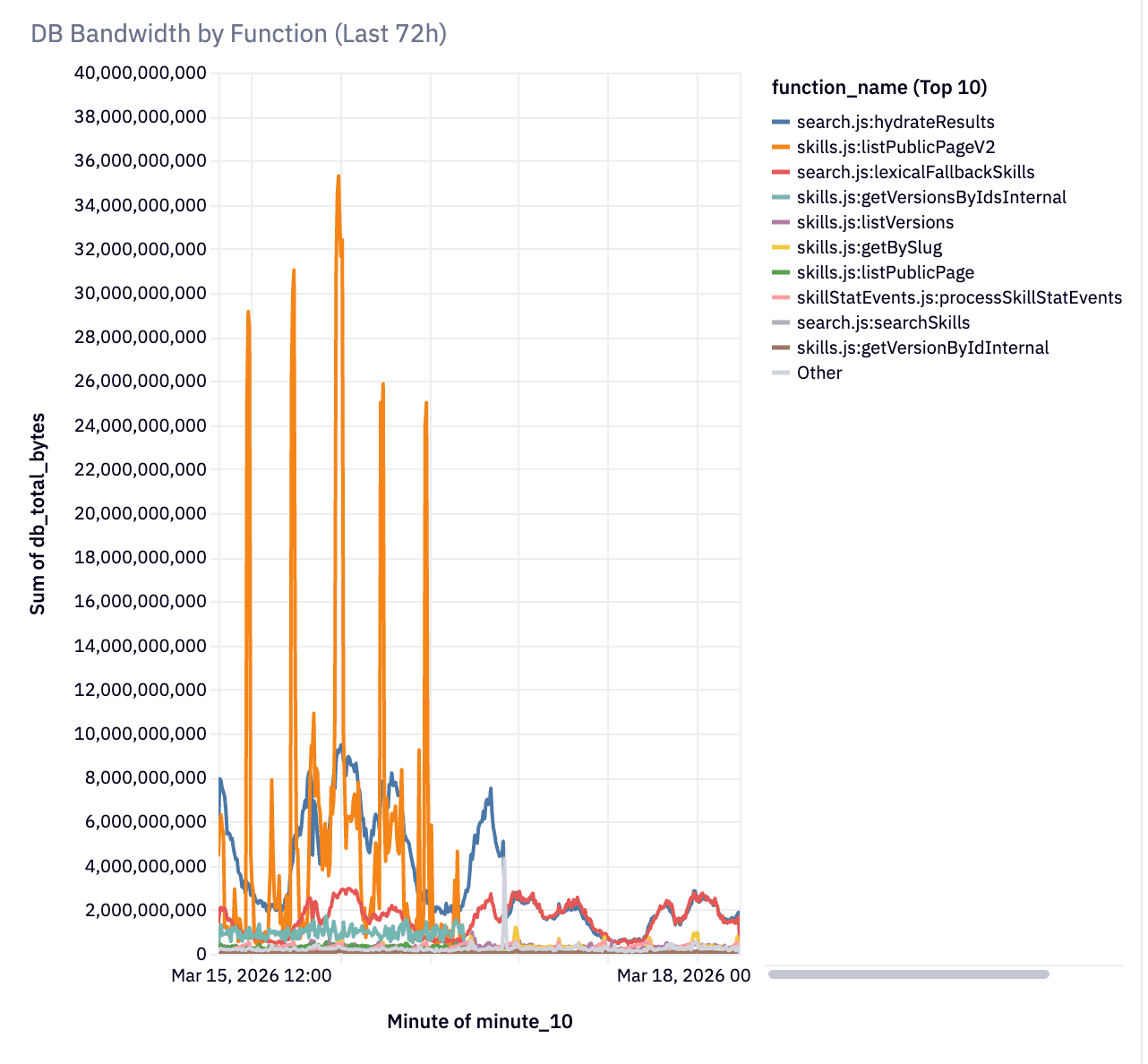
The instant influx of activity meant that their backend on Convex was doing up to 9 terabytes of database traffic a day! The vibe-coded repo did its job of serving millions of people what they were looking for, but it was pretty wasteful and inefficient.
You can break a Convex app. Nothing scales truly infinitely. The biggest factor in how well your application scales however isn't just how many users you have or how many queries per second Convex can process, it's how well your application is designed.
Today I will share how we iteratively improved the architecture of ClawHub to bring it down from 9TB of data a day to 600GB.
1. Keep the site up
Because Pete used Convex, the backend was ready to scale from 0 users to viral sensation, even on vibe-code. The primitives Convex provides you are incredibly easy for humans and AI to use without running into a whole class of distributed system challenges such as race conditions and low isolation levels. Convex is the backend as a service designed to give you peace of mind, enable reactivity, and get out of your way while you iterate on and beyond Product Market Fit. As load took off, Convex served. And served. And served. Up to 1.2 million users a week.
At that point, what had been acceptable inefficiencies for 100k users began to be real challenges at the scale of 1 million weekly users. Keeping latency and bandwidth usage down became the next pressing issue.
The speed of ClawHub was enabled by vibe-coding and a backend that scales. Now let’s look at how we improved the efficiency to even out load, decrease bandwidth usage, and decrease latency.
2. Keep costs down
Pete makes a distinction between vibe-coding and agentic engineering. In the first, all that matters is throwing something together really fast and seeing what works. In the second, you iterate with agents, guiding, reviewing architecture, and delivering a solid product, even if it is mostly written by AI.
ClawHub was vibe coded. That is how it found product market fit so quickly, and why it sky-rocketed to success.
Unfortunately, that means many aspects of it weren’t written with efficiency in mind. Convex was happily serving tens of millions of requests a week, but the code was silently (but happily) doing full table scans and joining large documents on every page list.
Even though the site felt speedy, under the hood it was chewing through bandwidth and compute, which can add up.
The good news is that Convex is designed to serve large amounts of users even on AI-written code. Of course Convex will do exactly what your code tells it to; if your code is inefficient, you’ll discover issues as you scale. Luckily, Convex primitives provide the tools to make your system scale. This guide describes how to tackle finding the hot spots in an application running at scale in Convex, use insights from the Convex cli to find and help you (or your agent) optimize every step of your app. Potentially by orders of magnitude.
Our Story Begins
Your analytics show you’ve hit 1M users a week 😄 Your Convex dashboard is showing more bandwidth than you expected 🙁.
Here’s the good news: nothing is broken. Convex kept your app online through all of it. No 503s, no connection pool exhaustion, no 3 AM pages. The platform is designed to absorb inefficient query patterns without falling over. Your users never noticed a thing.
Note: Developers new to Convex are sometimes confused by seemingly arbitrary limits around bytes read/written or timeouts. These limits are actually explicitly designed to help ensure the code that works on day 1 will scale with you as load grows. We want to help prepare you for success out of the box.
But “staying up” and “being efficient” are different things. The patterns that got you to product-market fit quickly — reactive subscriptions everywhere, full document reads, joins inside loops — are burning orders of magnitude more bandwidth than necessary. On ClawHub, an npm-style registry for AI agent skills, a single browse-page query was reading 17 MB per call. After applying the patterns in this post, the same page reads ~20 KB. The hidden cost of vibe-coded applications.
Let’s go over how to fix it with advanced scaling techniques. Don’t use these patterns for premature optimization. They’re the second set of patterns you reach for after the first set worked. The first set got you users. This set keeps them cheap.
Warning: If you have fewer than thousands of documents and moderate traffic, you probably don’t need any of this yet. Seriously — ship your app. These patterns are for after you’ve succeeded.
Reactive queries aren’t always appropriate
One of the awesome things about Convex is the instant realtime reactivity from server to front-end out of the box. It ensures users see in real time the latest and greatest. Reactive subscriptions are exactly right for collaborative features — a shared document, a chat room, a multiplayer game state. The data is changing frequently, the connected clients need to see those changes immediately, and the subscription cost pays for itself.
Definition: Reactive subscription
When you call
useQueryorusePaginatedQuery, Convex creates a standing subscription. The server watches every document your query touched and re-executes the entire query whenever any of them change. Your frontend component re-renders automatically with fresh data. This is the core of Convex’s real-time model.
However, they can be expensive for public catalog pages where hundreds of visitors are reading the same data that can have lots of tiny changes constantly. Every background write — a download counter incrementing, a new skill being published — re-executes the query. By default Convex caches query results to minimize this impact, but ClawHub had scrapers, each holding 85-page pagination subscriptions, so a single write could cascade into millions of document reads. Each client was asking for a slightly different version of the query. That’s a problem.
The first thing that might show up in your bandwidth usage reports on the convex dashboard is useQuery and usePaginatedQuery on high-traffic pages.
Luckily Convex allows you to have the best of both worlds: real-time updates for views that need it, and one-time snapshots where it’s not.
The immediate fix: one-shot fetches
If you were looking at a list of results for a web search on Google, it would be jarring if they jumped around while you were reading or clicking. Likewise, a public listing of all ClawHub skills doesn’t inherently benefit greatly from realtime re-ordering. If it was accurate at page load, it is better if it doesn’t jump around. For this, Convex has the ability to easily run a query once, saving the overhead of unnecessary subscription invalidations.
Tip: Turn subscriptions into one-time reads for non-reactive content
Replace reactive subscriptions with convex
.query()for any page where users don’t need real-time updates.
1// 😬 Reactive subscription — re-executes on every write to the read set
2const results = usePaginatedQuery(
3  api.skills.listPublicPage, args, { initialNumItems: 25 }
4)
5
6// ✅ One-shot fetch — no subscription, no amplification
7
8const convex = useConvex();
9
10const result = await convex.query(
11  api.skills.listPublicPage, { cursor, numItems: 25, sort, dir }
12)
13
Same backend query. Same data. Same UX. Manage pagination state in React with useState and a generation counter to cancel stale requests. The user refreshes when they want fresh data — and for a catalog page, that’s fine.
Definition: Read set
Every document your query touches — including documents fetched with
ctx.db.get()— becomes part of the query’s read set. For reactive queries, a write to any document in the read set re-executes the entire query. Joining three tables means writes to any of those three tables trigger re-execution.
| Pattern | Use when |
|---|---|
useQuery | Data is collaboratively edited and every client needs immediate updates |
usePaginatedQuery | Real-time paginated data with small, bounded page counts |
convex.query() | Many readers, mostly-static data — catalogs, listings |
If you’re using Next.js, fetchQuery serves a similar purpose for server-side rendering.
Documents no bigger than your UI
Once subscriptions are under control, the next thing you’ll see: your queries may be reading way more bytes than the UI renders.
Convex returns full documents — there are no field projections. If your document is 3 KB but your listing page only needs 200 bytes, you’re reading 15x more data than necessary. And it gets worse with joins:
1// 😬 Three tables, ~195 KB per page of 25 items
2for (const skill of skills) {
3  const version = await ctx.db.get(skill.latestVersionId)  // 6 KB each
4  const owner = await ctx.db.get(skill.ownerUserId)          // 1 KB each
5}
6
Each ctx.db.get() inside a loop is a join. Each join reads a full document and widens the reactive read set. Someone updates the birthday on their profile? Every browse-page subscription re-runs, because users is in the read set, even if the birthday isn’t displayed for everyone.
The fix: a digest table
Create a lightweight table with only the fields your hot path needs, including denormalized fields from joined tables:
1// convex/schema.ts
2skillSearchDigest: defineTable({
3  skillId: v.id("skills"),
4  slug: v.string(),
5  displayName: v.string(),
6  summary: v.optional(v.string()),
7  statsDownloads: v.number(),
8  // Denormalized from users — eliminates the join
9  ownerHandle: v.optional(v.string()),
10  ownerImage: v.optional(v.string()),
11  // Denormalized from skillVersions — eliminates the join
12  latestVersionSummary: v.optional(v.object({ ... })),
13})
14
Now the browse query reads from one table with no joins:
1// ✅ One table, ~20 KB per page — no joins, narrow read set
2const page = await ctx.db
3  .query("skillSearchDigest")
4  .withIndex("by_nonsuspicious_downloads", (q) =>
5    q.eq("softDeletedAt", undefined).eq("isSuspicious", false)
6  )
7  .order("desc")
8  .take(25)
9
Definition: Denormalization
Storing a copy of data from one table inside another, so the hot read path doesn’t need to join. The tradeoff: you need to keep the copy in sync. The payoff: on ClawHub, this took page reads from 195 KB to 20 KB — a 10x reduction with no UI change.
Tip: Audit
ctx.db.get()inside loopsSearch your query functions for
ctx.db.get()calls inside loops orPromise.all()blocks. Each one is a join that reads a full document and widens the read set. Ask: can this data live in the table you’re already reading?
Keep the digest in sync without causing a stampede
Use Triggers from convex-helpers so any write to the source table automatically syncs the digest:
1// convex/functions.ts
2const triggers = new Triggers<DataModel>()
3
4triggers.register("skills", async (ctx, change) => {
5  if (change.newDoc) {
6    await upsertSkillSearchDigest(ctx, change.newDoc)
7  } else {
8    await deleteSkillSearchDigest(ctx, change.oldDoc._id)
9  }
10})
11
12export const mutation = customMutation(rawMutation, customCtx(triggers.wrapDB))
13
This is clean, automatic, and — if you’re not careful — capable of creating a 55 GB bandwidth spike.
Definition: Thundering herd
A batch write (like a cron updating stats for 500 skills) fires the trigger 500 times. Each trigger write invalidates every active subscriber. Each subscriber re-reads its full page of documents. The cost isn’t
500 writes— it’s500 writes x subscribers x docs_per_subscriber. This is a thundering herd.
The fix is three lines of comparison logic:
1const existing = await ctx.db.get(digestId)
2const changed = DIGEST_KEYS.some((key) => existing[key] !== newFields[key])
3if (!changed) return // no write = no invalidation
4
This was the single highest-impact fix on ClawHub. Most cron updates were no-ops — the download count hadn’t changed since the last run. The trigger faithfully wrote identical values, causing 500 invalidations for nothing. Three lines of change detection turned 55 GB spikes into a flat line.
Tip: Compare before writing to a highly-subscribed table
This applies to triggers, crons, backfills — anything that writes to a table consumed by reactive queries. Don’t write when nothing changed. The cost of the comparison (one extra read) is negligible compared to the cost of an unnecessary invalidation cascade.
Use the index, not the if statement
ClawHub shouldn’t show skills that have been flagged as suspicious by default. The first shot at programming this might be to get all the active skills, and loop over them, removing if the suspicious flag is set.
You can get away with this for thousands of documents, but it can quickly become a pinch point. Indexes are the way to solve this. If you’re filtering documents after the query returns them, you’re reading documents just to throw them away. Indexes allow you to only read the documents you want from the db, saving time and bandwidth:
1// 😬 Scans every document, filters in JS
2const allSskills = await ctx.db.query("skills")
3  .withIndex("by_active_updated", (q) => q.eq("softDeletedAt", undefined));
4const skills = allSkills.filter((skill) => !skill.isSuspicious);
5
6// ✅ Database skips non-matching docs entirely
7const skills = await ctx.db.query("skills")
8  .withIndex("by_nonsuspicious_updated", (q) =>
9    q.eq("softDeletedAt", undefined).eq("isSuspicious", false)
10  )
11
Definition: Compound index
An index on multiple fields. Convex indexes are ordered: the database walks the B-tree to the first matching entry and scans forward. Adding a field to the index lets the database skip non-matching documents instead of reading them and filtering in your code.
Tip: Audit
.filter()andif (doc.x) continueSearch for
.filter((q)andif (doc.field) continueinside query loops. Each one is a candidate for a compound index that eliminates the scan. filter runs after all the data has been pulled from the db, you pay for it in bandwidth and byte limit.
Backfills and heavy mutations
Two more patterns that surface once the big wins are in:
Rate-control backfills. When backfilling a new digest table, each batch of writes invalidates active subscribers. Spread out the writes with a delay between batches:
1if (!batch.isDone) {
2  await ctx.scheduler.runAfter(
3    1000, // spread out invalidation waves
4    internal.maintenance.backfillDigest,
5    { cursor: batch.continueCursor, batchSize: 100, delayMs: 1000 }
6  )
7}
8
Add a stop flag too — check a control document at the top of each batch so you can halt a runaway backfill.
Split heavy mutations. Mutations that read more than 8 MB hit Convex’s transaction limits. Split into Action -> Query -> Mutation:
1// 😬 Single mutation reads 32K docs — hits transaction limits
2export const computeLeaderboard = internalMutation({
3  handler: async (ctx) => {
4    const allSkills = await ctx.db.query("skills").collect()
5  },
6})
7
8// ✅ Action orchestrates, query reads, mutation writes
9export const computeLeaderboard = internalAction({
10  handler: async (ctx) => {
11    const data = await ctx.runQuery(internal.skills.readLeaderboardData)
12    const results = computeRankings(data)
13    await ctx.runMutation(internal.skills.writeLeaderboardResults, { results })
14  },
15})
16
Note: Atomicity guarantees
Convex ensures all writes that happen in a mutation are atomically applied. If you changing behavior to call multiple mutations from an action, each mutation will run atomically by itself, but the mutations will not all commit together atomically
The optimization loop
Here’s what makes this catch-up feasible: Convex gives you the tools to run a tight feedback cycle, and the breathing room to do it while your users keep using the product.
11. npx convex insights --prod  → find the top bandwidth consumer
22. Read the function            → understand why it's expensive
33. Fix it                       → usually a data model change (migration)
44. npx convex deploy            → live in production, zero downtime
55. Check the dashboard          → is it flat? Go to 1.
6
Each cycle, the top offender gets 10-100x cheaper and the next layer reveals itself. On ClawHub, this loop ran eight times over four days. The site served over a million visitors that week while we rewired the data layer underneath them. No downtime, no maintenance windows, no user-facing errors.
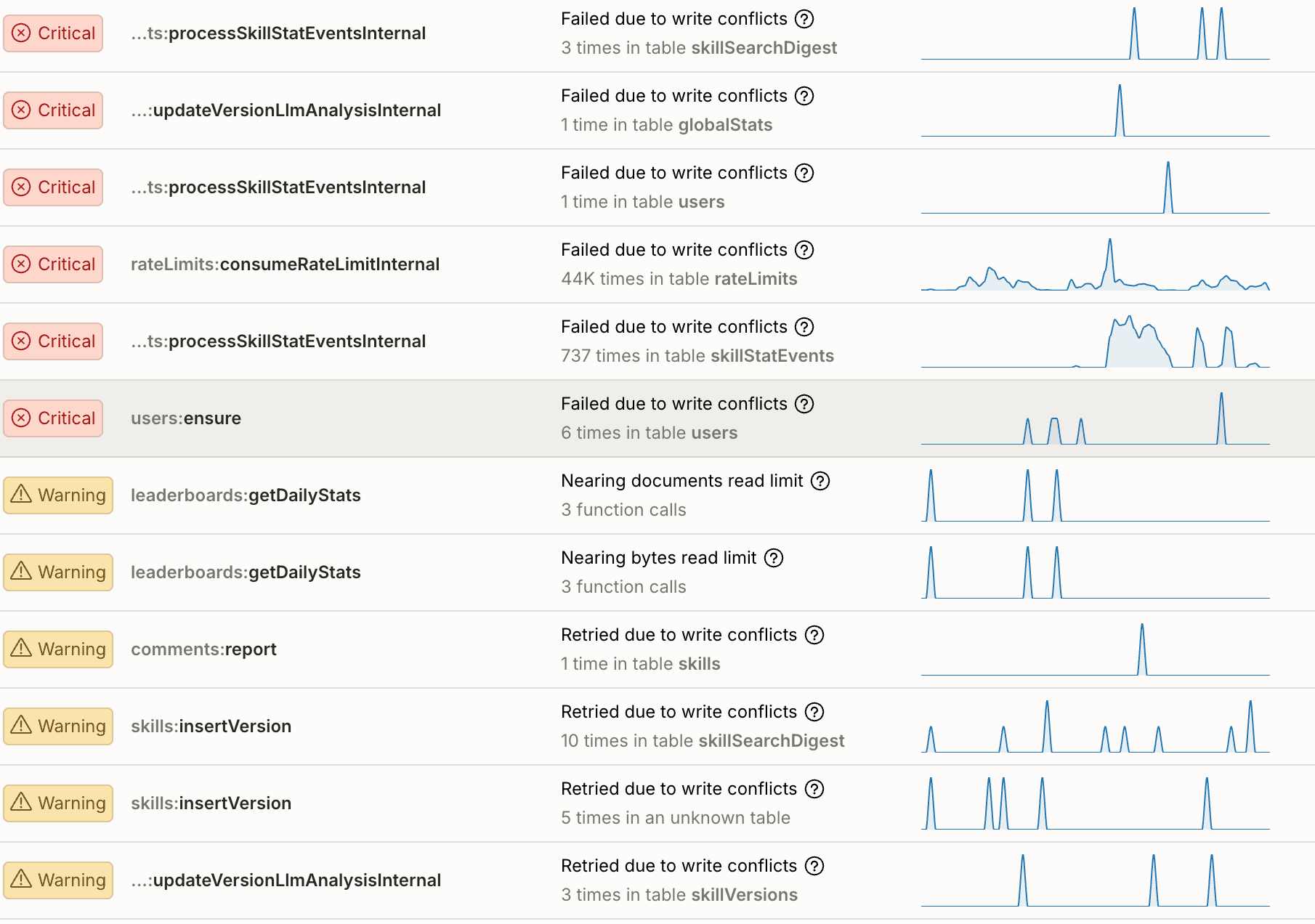
When the remaining warnings in npx convex insights are all OCC contention instead of bandwidth limits, you’re done.
Teach someone to fish, and you feed them for life. Teach their AI to fish, and they can relax on the hammock
While it would be ideal if you designed everything perfectly from the start, that’s not tenable. Not only would that require anticipating all the feature’s you’ll need, it can require predicting very hard to understand interactions between data models. This can slow you down and prevent you from iterating quickly to find Product Market Fit.
Convex will let you iterate quickly with less than perfect code to find what works. Once you’ve found PMF and are scaling, you can use these skills to make things scale another 1000x.
But what if we could have the best of both worlds! After iterating with AI to tackle these optimizations, we had AI synthesize the lessons learned into a skills file. Of course we iterated on it, by putting a fresh agent in the codebase from before the optimizations, giving it the skills file, and having it attempt to solve the problems. After 7 iterations, we landed on a very efficient skills.md that you can give your AI to solve these problems before you have them, so you can focus on what you do best: making amazing products.
Takeaways
Scaling a read-heavy Convex app comes down to three things:
- Match subscriptions to access patterns. Reactive queries for collaborative features. One-shot fetches for public catalogs.
- Minimize what you read. Digest tables, compound indexes, no unnecessary joins. Your browse query should read the smallest document that serves the UI.
- Don’t write when nothing changed. Change detection in triggers allow you to denormalize and minimize cache invalidation. Delaying between batch can consolidate multiple invalidations reducing thundering herds. Every unnecessary write is
subscribers x docswasted reads.
Convex stays up while you figure this out. Your app absorbed real traffic from real users on patterns that were burning 1,000x more bandwidth than necessary — and nobody noticed. That breathing room is the point. Ship fast, find users, then come back and match your patterns to your actual traffic.
Further reading
- Queries that Scale — indexing, pagination, and cache optimization
- Triggers — automatic side effects on database writes
- Custom Functions — wrapping mutations with custom context
convex-helpers— triggers, custom functions, and more- Come chat with us in Discord
Convex is the reactive backend platform that keeps up with you and your agents. Database, functions, workflow, sync, search, file storage, and more. All TypeScript, zero glue.