Building Convex OS, a Browser-Based React App with Real-Time Sync
Writing end to end tests has traditionally been a bit of a pain in the bum. They depend on so many specific details about your app such as UI elements being in exact locations on the page or the page containing specific text or the route being structured exactly as it is now. But that's the thing, your app is a constant evolving thing and it's going to be changing as new requirements come in. This means your fragile end-to-end tests are going to need to change quite [music] frequently, which is not only frustrating for you, the developer, trust me, I've been there, but it's also a big waste of time. There's a reason why the famous testing pyramid [music] puts the end to end tests at the top and the much easier to maintain unit tests at the bottom. So, what often ends up happening is you end up with some crazy deadline that you need to meet and your tests aren't passing. So, you end up commenting out the test just so you can get your bill to pass and you get your deadline and get your feature out on time. And you you'll come back to to uncomment those tests when things settle down. Right. Right. And besides, that's what the QA department's for, right? Those guys should catch any issues that might crop up as a result of your changes. But what if your company is too small for a QA department or your app is so large that there's no way the QA guys are going to be able to test everything before each release? If only there was a way we could somehow access that self-directed intelligence of a human QA worker, but package it up into a box and have it run on the CI and every single commit. I think you can probably see where I'm going with this. Stage hand is a library from browser base that allows us to use natural language to control a browser. So you can see in this very nice little animation they have here that shows how you control the browser to open to a page and ask it to extract the price of the first cookie and ask it to add to the cart before completing the checkout process. This is super cool because nowhere in here am I specifying details such as the exact button ID or the DOM structure that's expected to exist. It's just a natural set of instructions that you would give any human to follow. So that's what we're going to look into in this video. We're going to go through how to get set up with stage hand and convex, how to use it in a real project, some tips and tricks that I learned along the way, and [music] how much all this is going to cost. Spoiler, it's less than you might think. And I'm also going to finish on some future work here. I personally think this is a really exciting and valuable use case for AI that you can get going with today and get some real productivity gains. [snorts] So, once you've dropped me a like and sub, let's get into it. Okay. To get started, you're going to need a Convex project of some sort. Um, well, actually, technically, you can use Stage Hand without Convex, of course, but for this video, we're going to use Convex. I won't go through all the steps of getting set up with a Convex project here. Just hop over to the docs and follow one of the quick start guides. Once you've done that, you can install your favorite testing library. Mine is currently Vest, and this will be the one I'll be using in this video. Okay, so I'll just pause here for now and just show you um the project that we're going to be building our end to end tests for. So this is a personal project that I have slowly been hacking away on over the course of a few evenings and weekends. It's a website built for uh my local community for their annual Christmas lights competition. So you can book tickets to go on a cruise boat that goes around the canals and checks out all their houses and their light displays. This website also manages a competition that's being run. So, you can see there's a few mock entries on the page here. If I click one, you can see in a carousel of the pictures for the competition entry. Um, if you click on this button down here or the map button at the top, you can view the entry on a map, which is quite nice. If I click another entry, then I can choose to view the entry, which opens up um the entry page, and I can choose to vote on it. So I can choose to vote in one of the two categories um if you are signed in. Speaking of being signed up, so um you can click here uh on my entry to enter the competition by filling out the various details like so. Once done, your entry enters a submitted state which then needs to be approved by the competition organizer um [music] from the admin page here. Obviously only certain users are going to get this admin privilege. Um, [music] not all users are going to get the chance to do this, but anyway, if I approve it, it should now show up on the map. [music] Now, I'll save you the technical details of how all this works under the hood. Uh, probably not relevant for this video, but if you are interested in me doing a video on the internals of this project specifically, then leave me a comment down below uh or a thumbs up on somebody else's, [music] as it's the best way, best signal that I have to know what to make next. Okay, so you now have a sense of what this project's all about. Let's have a look at writing some uh end to-end tests for it. [music] Okay, so the first thing you want to do is split your end toend [clears throat] tests from your unit tests because you're probably going to want to run these test these test categories independent of each other. You're not going to want to run end toend tests which take a lot longer at the same time as running your unit tests probably. [music] So there's a couple of ways of doing this, but I think this is the best way to do it um is to use Vest's projects feature. So we can do this by pulling out our current unit testing config into a separate project section like so. Now we have end to end project and a unit project uh which only includes certain test files and have specific test settings. Then you can just run one project with bunx v test run project unit [music] or end to end or whatever. It's pretty cool. Okay. So, as you may have noticed from the config, this project already has some uh existing unit tests that live inside the convex folder, shared in source directories. And this is generally the way that I like to write my unit tests. I like to have them live alongside the source code that they are testing. End to end tests though are a bit different as they're usually testing a much larger set of behaviors in the application. So I like to put them into their own separate folder uh that I've here called end to end or E2E sorry. Okay. So before we look at the actual tests, let's talk a little bit about the setup that you're going to need to do first. So let's take a quick look at the stage hand docs here. So as we talked about in the intro, stage hand is a framework that's going to allow us to use AI to automate the browser. To do that, it leverages the awesome Playright library. In fact, Stage Hand is built on top of Playright. And by the way, if you're not familiar with Playright um or others like Puppeteer or Selenium, they basically provide an API around the browser like Chrome, Firefox, Safari or whatever and allows you to easily call functions to navigate pages, get contents, take screenshots, [music] etc. Anyways, the point is for these to work, you need to obviously have a site URL to point at to be able to navigate around. And we could do this by pointing to our currently running local dev server that I'm using here um that we start when we do um bun rundev. But the problem is is that this web server is pointing [music] to our our uh development convex deployment. And the issue with that is that we want the test to be repeatable as possible. And so that means that each time we run this and between each test ideally we want to have a nice clean repeatable environment to work from. And so if I am developing this app here and my end to-end tests are running at the same time they're going to keep wiping my state that I'm developing with and they're going to mess up my environment variables and whatnot. So it's not a great experience. You kind of want to separate these two development environments. So instead, what we need really is to be able to we need a way to be able to spin up a convex backend dynamically that runs independent of our development uh environment. And then we also want to be able to run to spin up a new vit instance and then point that to our new temporary backend. So that's what we're going to do here with this setup E2E function. Let's just pop it open. And we can see at the top here we have this convex backend and a V front end and a stage [music] hand instance. Then down here we have uh a test before all function which is going to run before any test runs um in the suite. So the first thing it's going to do is it's going to init our convex back end. And if we just quickly open that we can see that it's going to work by downloading a copy of the standalone convex backend [music] binary. Did you know that convex is entirely open source by the way? Um and you can run it either from Docker container or as an entirely standalone self-contained binary file which is really nice. It's pretty cool if you ask me that you can get all this power of convex backend wrapped up into a a single binary file like this. Anyway, back to the code. We now have the binary downloaded. So, we can just boot it up on a random port. And also just note this super important bit here because we're starting up the the back end ourselves. We can pass it an arbitrary instance name and secret which we have uh I have a couple hardcoded up here but those mean that we can pass it an admin key which allows us to do adminy things on the back end such as changing environment variables or deploy code to it [music] and that's exactly what we're going to do here once it's up and running. We're going to deploy our code from our convex directory in our project to our testing instance here. Now just back up to our our setup function from before. So now that we have our convex back end running, we can take the URL that it gives us and pass it to our VIT front end instance to start up um with our convex back end. So now that we have our front end running as well, we can boot up our stage hand instance which is going to start playright. Open the browser and we're all good to go. You notice that I'm also doing a couple of things down here with private keys. This is the setup authentication system in the application which is convex or um but I'll talk more about that in a bit. Okay. So finally we can have a look at the actual tests. So firstly you'll notice that I've split them up into three distinct describe or distinct categories of tests. I want to test everything from the perspective of a public user. So that's one that's not logged in or authenticated. I also want to test on the perspective of a voter. So somebody just wants to come and vote on something. And I also want to test from the perspective [music] of somebody who wants to enter the competition. So a a competition entrance. I structured it like this because don't forget the purpose of end to end testing [music] is to test the highle behaviors of application and ultimately give you the developer the confidence that the system is working the way that [music] you intended to. So I want to ensure that for the various kinds of users that going to be using my application [music] that it's going the main ways of using the application is going to work as I intended to. But let's dive into this test a little bit more now. So let's have a look at the simplest case first for a non-authenticated or a public user. So let's have a quick look at the application first just to show you what it is that we're going to be testing [music] for here in this first test. So if I open up the application, I'm going to sign out to make sure that I'm a public user. And then I want to make sure that my visitors are going to be able to buy a ticket uh to go on the cruise from the from the first page. Now there's two ways you could do that. You could either click on this button from the top navbar up here or if I scroll down a little bit here, you can click on this big red button to go buy the tickets. Ticket buying, by the way, is handled by Eventbrite, which doesn't actually work on local hosts. It has to work on HTTPS. Hence why I get this error when I press the button. But here's what it looks like when it's running on an actual HTTPS domain. But for the purpose of this end to end tests, I'm happy if users can just navigate to the stickers page here. And um there's a button that they can press to open up that eventbrite model. I'm happy if I can test that that set series of steps working. Now if we hop back to the code, we're going to start by calling this go to function. And this is a special function that I'm exporting from the setup A2 function from before. If we quickly have a look at that, we can see it's just a simple wrapper around stage hands go to call, which is in turn going to call playright to navigate a URL. I wrote this wrapper just as a way to abstract away the prefixing of our our locally running V server and to pass [music] in a type safe route um that I'll show more in a little bit later in this video. Okay, so by this point we should be on our correct page and now we [music] can finally actually do the meat of our test. So we can tell the stage hand AI to act by clicking the book tickets now button. Then we ask AI to observe the page to find the buy tickets button. And we finally do our expect here to make sure that if this is not the case, then this test should fail. Okay, so pretty simple. Let's take it for a spin. So I could either run this uh test by using the command line like I showed you before. But if you install the test VS code extension, you get this very nice UI in your IDE. So you can just click here to execute the test. So we can see doing so is going to start up a browser on the homepage. It's going to navigate to the tickets page and then the browser is going to close and our test has succeeded. Huzzah. And you'll notice in the output panel here is a bunch of logging information and a little uh summary about the number of tokens and the estimated cost. I'll talk a little bit more about the cost um [music] in in later in this video. But all these log settings and everything is obviously configurable inside the setup function I have here. Notice I've got the verbose logging turned on and a custom logger written here as I felt like I wasn't getting quite enough information that I needed um while I was testing this. And you'll also note that this is really nice thing about playright here is that you can actually record a video of your run. Um I've got that turned on. So if I open up the the folder here, I can see there's a bunch of videos from various runs I've done before and I can click one to watch it. This is super useful if you ask me. um and very very useful if you run in a headless environment like on your CI server which we'll talk a little bit more about in a bit. Okay, so one test down. Let's have a look at another test now. So again, this one's for a public user. It tests that the user should be able to navigate to the entries [music] page and view the entries there. Now obviously if the database is empty, we're going to end up with a blank page like this. So to fix that, we have this handy client object that I've exported from the convex back end which allows us to call our create mock entries mutation here. If we just click into that, we can see that this is a testing mutation. So this is a custom mutation that I've defined up here. And if you want to learn more about how to do this, this is called um custom functions. You can check out the convex helpers library. Anyway, so this testing mutation is just a normal mutation except it doesn't allow calling it unless we have this is test environment variable set. But if it is set, then the handle is going to get called, which means that it's going to call this function here, which is basically just going to generate a bunch of random mock entries for us. But I'm not going to go over the details of that right now. It doesn't really matter. Let's head back into our test. So by this point in the test, we should have some entries created on the screen. So we should be able to ask stage hand uh to extract some data from the page. And the nice thing about this API is you can specify a zod schema that the result should take. So here I expect there to be an entries which is an array with an entry name and the entry number. Then after that I'm going to check the length of the array and it should indeed be nine because that's the number of mock entries we created up here. Okay, so that's about it. Let's take this for a spin. So again, we can watch it and the homepage loads. It navigates the entries page, which is empty to begin with, and then it's populated and then exits and our test passes. Super duper nice. Okay, so now we've seen the three main APIs of Stage Hand. Act enables Stage Hand to perform individual actions on a web page. Extract grabs structured data from a page. Observe allows you to turn any page into a checklist of reliable actions. And there is one final one here which we haven't looked at yet which is in my opinion potentially the most interesting one which is agent. This turns highle tasks into a fully autonomous browser workflow. So let's just take a quick look at that one. Now to begin with let's just have a look at what it would look like if we had been doing it the way we've been doing up till now as a series of individual steps. So, we're going to start out going to the homepage as usual. Then, we're going to sign in because voting requires that you are [music] authenticated. How this signin process works doesn't is not really important right now. We're going to have a look at that in a minute. Um, for now, just assume that this logs you in and returns the user object me here. Okay. So, now we need to an entry to vote on. So, let's create one here. Then let's shortcut things a bit by having the page jump to the dedicated entry page um that we're specifically interested testing in uh for this voting flow. By the way, this is kind of what I was talking about with the type safe routing. This is all thanks to the type route library. I really need to do a dedicated video on this library because I'm in love with it. Um but anyways, now that we're on the entries page, [music] we can click on the vote button and then uh vote for the best display. Then we can grab all the votes again using our custom testing query here that will only be available when running testing in the testing context. Then we should expect there to be exactly one vote and the voter should be me object and it should have been for that specific category. And now we can just give this a crack. You can see it opens the page goes to the home quickly signs in opens the entry page opens the vote modal and votes. Right. So there's quite a few manual steps involved in this process and [music] I guess you could argue that we're tying ourselves too closely to implementation going back to the way that we were doing things at end to end test before where we were again expecting things to be in certain places. [music] So let's imagine now of ourselves to be in the place of our users. When they land on the site they aren't going to know where everything is or how to get there. their only goal really is going to be I I want to vote on this entry with a [music] specific entry number. So that's what we can simulate here with this agent function. We can give it the very high level goal to vote for an entry with the number that we provided from the mocks that we created up uh up here. Then once again we can expect the vote to be in the correct category for the right entry. Also, just note here that I haven't told it that it needs to be able to log in to vote. It's up to the agent to work out how to do that or that it needs to do that just like a human user would would have to work this out. Okay, so let's take this for a spin. So, it's going to take quite a bit longer to run. So, I'm going to speed things up a little bit and as we watch it go to um the right page and then sign in and then go back to where it was before and then cast the vote. And huzzah, it works. So, this is super nice, right? As we aren't anymore tying our behavior to our implementation at all. It's almost as if we've been able to have a new fresh user test out our site with no prior knowledge. And another really nice benefit of this is that we get to watch the AI struggle as it navigates our page. And we get to read its thinking. And this is super valuable because it gives you fresh insight into what difficulties actual human users may very well encounter as they use your site as well. I actually experienced this myself in another agentic test down here that I have for entering competition. I asked the AI to work out how to enter the competition. I watched it as it navigated around the site. I saw that it would start off from the homepage here and then it would think about how do I enter the competition and it would click this entries button up here because that's the one that looked the most relevant and then it saw this big view competition details button at the top here and it click that and then it would get confused on here because there was no indication on this page here exactly how to enter the competition. So when I noticed that I was like ah I need to add a section at the top of the the page here so that gives a nice clear button um to enter the competition. So this kind of like user experience optimization is really cool because it wasn't really possible [music] prior to the invention of LLM outside of doing expensive and timeconuming user studies. Now, I have to admit that although it did run and succeed on this particular run, it's unfortunately not always the case that it always succeeds. And I think that maybe this is just the price you're going to have to pay for this non-deterministic AI having free reign over navigating around your app. It's just sometimes it's just going to go down another branch of possible possible ways of doing something and it's going to get stuck sometimes and not work out how to be able to solve the test. Now, I suspect there are ways that we could go about minimizing this um by prompting things a little bit more carefully or simply increasing the intelligence of the model, the size of the model that you're using actually. So, let's just talk about the the model stuff now. So, um I experimented with quite a few here as you can see from inside the setup E2E function. I really like the speed of the Gemini flashlight model and it is super duper cheap. Um, but as this eval graph that is on the stage hand site shows you, it's just a bit dumb and um, it would often kind of it would it would not always reliably get the result. So, right now I'm actually using the GBT5 mini model. I found that it's kind of the right sweet spot for me for like the really good intelligence and cheap price. As we can see from the run output from before, um that is actually cost us to do that one test considerably less than a cent to run, which in my opinion is pretty good for like an on demand QA department like this. So other than globally setting setting the model um that you want, you can actually change the model per agent or even per step if you want. I haven't experimented too much around with this yet, but I can imagine getting quite clever with this where you could get it to run using the dumb model to begin with and if it fails, maybe like progressively increase the intelligence until it passes. Okay, so this video is getting way too long, but I have two last topics that I want to cover before we wrap up, which is orth and CI. So as you saw before the AI is able to work out how to sign in itself and we're also able to do this program programmatically signin process. So now this application is using convex or to authenticate it users and I'm only using Google or as you can see from the signin page here. Now this is a problem for end to end tests because I don't want the AI to have to use Google account to every time it wants to sign in to be able to to run the test. it would be slow and problematic and probably Google will end up blocking me eventually. So instead when we start the V front end in our setup function, we pass in this vit is test mode flag. Then in our sign-in page, I do a check for that flag [music] and instead of rendering the normal page with the Google orth on it, I instead going to render this test or page. So this is that page that you may have briefly uh noticed earlier. This lets the AI pick a name, a username and sign in. Then on the convex side, we have this special testing credentials provider for the convex orth object. And we're going to make sure that it's only available when we're running in test mode. Then that provider is just basically just going to do the the dance that we need for convex or creating a new user, etc. And this works really well. The AI is now able to optionally sign in if it wants to. Sure, it's not exactly the same flow that the real human would take. Um but again testing is all about giving you the developer confidence that your your app is going to work the way you expect it to. So in my opinion it's a good compromise. Now the question is is I guess how would you do this for other or solutions on convex such as better or clerk web etc. Well that is a good question. I actually haven't done those yet. Uh so I'm not entirely sure but I suspect you'll be able to be able to do this kind of shortcutting flow no matter which solution you're using. But having said that, if you would like me to do see more information on this, leave me a comment down below and I will do a follow-up on it. Okay. So, the final thing I want to talk about now is running these tests on the CI because it's all well and good having these end to- end tests written, but if you aren't going to run them, then what's the point? So, I was a bit nervous going into this because I've had nightmares in the past trying to run um end to-end tests on a headless browser in CI environments. Um, but I have got to admit I was pleasantly surprised about how painless this was getting this all running. So here's the GitHub actions file that I used to make this all work. So first it checks out the code, installs bun, install the dependencies. Then I set up some caching for the playwright browser so that we don't have to redownload it every time we want to run these tests. Then we install the browser and run the tests. Now I'm going to have to pass in our uh keys here into the stage hand tests. I'm passing both the Open AI and the Google ones here as I was experimenting with both those kinds of models. And once these tests are done, it's going to upload the recorded videos to the artifacts. So, you can go and download them and re-watch them and um see what happened. Very nice. I really like being able to download the videos and watch them if if something didn't go quite as expected and try and debug it. By the way, if you don't want to mess around with all this CI stuff yourself, browserbased, the makers of Stageand, have a cloud offering which makes it super easy to run your tests on their cloud with realtime video feedback and all the other bells and whistles. So, if you don't want to go through all this headache yourself, go and check them out. Okay, so we're getting very close to finishing here. I just want to talk about one extra thing, which is the future of this work. I'm personally really bullish on the potential for this and I'm going to push internally to try and get my halfbaked setup that I've got going here turn into a really fully featured end to- end testing solution for convex. If you agree with me and think that this is something that we should spend some more time on, then drop me a comment down below as it will help justify the reason for spending more time on it. I think even if we can just make it a little bit easier to download and spin up a standalone convex back end without having to write so much messy code like I did it I did before then I think this will be a big help. Oh, and by the way, if you want to get access to all the code and everything that I've shown in the video, then I've left links to all of it down below. And just before I wrap up here, I want to leave you with one solid piece of advice I was given to by a good friend of mine and mentor Stray many years ago when I first started to learn testing. She said, "If it's worth manually testing something, then you might as well make it repeatable." And this has stuck with me ever since and has echoed in my head over the past year as vibe coding has taken off. Rather than continually manually testing the output from the AI over and over again, because who knows what might have broken this time around, you might as well make your manual tests repeatable by writing some end-to-end automated tests. And hopefully now with stage hand those end to-end tests that were so brittle before are hopefully much less of a pain and much easier to main maintain over time. And on that note, thanks for watching everyone. Until next time, cheerio.
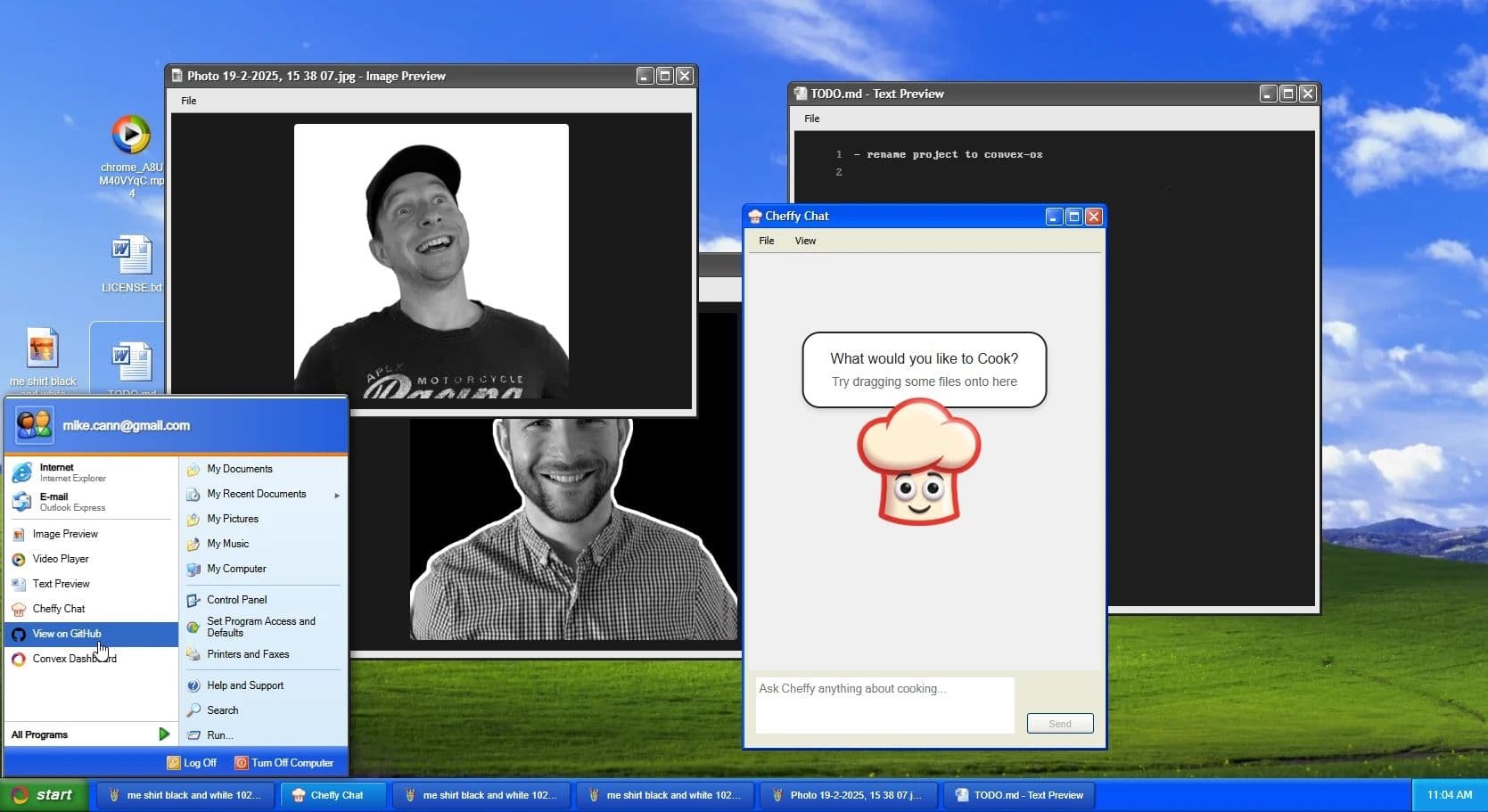
A few weeks ago I built Convex OS, a Windows XP desktop styled React app that runs entirely in the browser and stores almost all of its state in Convex. Every window position, running process, and file you drag onto the desktop lives in the database, which means opening a second tab gives you the same desktop, and moving a window in one tab moves it in the other.
I had seen a wave of web-desktop interfaces showing up online and wanted to try the pattern myself. The interesting part is that an OS metaphor is mostly an exercise in state management, and Convex's reactivity model makes multi-tab continuity something you get for free rather than something you have to engineer. The full source is public if you want to read along, and most of what follows is easier to understand with the repo open in another tab.
What Is a Browser-Based Operating System
A browser-based operating system is a desktop-style UI rendered inside a web browser, where windows, files, and application state are managed by web technologies rather than a native OS kernel. It looks and behaves like a desktop environment, but the "kernel" is JavaScript and the "filesystem" is whatever backend you wire up.
The category splits into roughly four flavors:
Cloud-backed thin clients that stream a remote desktop to the browser
In-browser emulators that boot a real OS inside WebAssembly
Web-desktop UI layers that simulate the desktop metaphor with web primitives
Remote-streaming containers that pipe a containerized desktop session over the network.
Convex OS sits in the third category, a web-desktop UI layer with a real-time backend doing the state work. I'm not emulating an x86 chip or booting a Linux kernel in WASM; I'm building a desktop UI whose state happens to be reactive across tabs, a different exercise with a different set of trade-offs. The hard parts aren't graphics or kernel emulation but how you model windows and processes as rows in a database, and how that database keeps every open tab in agreement about what is on the screen.
The distinction matters because the techniques you reach for are different. If you're emulating a real OS, your time goes into compatibility layers and performance work. If you're building a web-desktop UI layer, your time goes into schema design, sync, and UI ergonomics. I'm firmly on the second path.
Why I Built Convex OS
I had been seeing web-desktop homepages crop up in my feeds and wanted to try the pattern. Windows XP felt like the right aesthetic because the look is well-supported by existing CSS libraries, and because, honestly, the nostalgia helps when you're showing the project to other developers.
From a Convex perspective, the part that drew me in was that nearly all of the UI state belongs in the database. Windows have positions, files have upload progress, and processes have running state. If those things live in Convex, then multi-tab sync isn't a feature I have to build; it's a property of the system. That inversion, where the thing that would normally be the hardest engineering problem becomes the thing you get for free, is what made the project worth doing.
There is also a smaller motivation worth naming. I wanted to see how far the "everything is a row" approach could be pushed before it strained. An OS metaphor is a useful stress test for that approach, because it has a lot of state, a lot of cross-entity relationships, and a lot of interactions that traditionally live in a client-side store. If Convex can hold all of that without me reaching for Redux or Zustand, the pattern is doing real work.
The Stack With React, Vite, and Convex
The frontend is React with Vite. There's no SSR because the whole thing is a stateful single-page app, and trying to server-render a desktop you're about to hydrate into a fully reactive state machine adds work without giving anything back.
Authentication is handled by Convex Auth with username and password. I skipped social login because the demo is meant to be poked at quickly, not signed into seriously. Styling uses xp.css for the authentic XP chrome, and the icon set is borrowed from a public Windows XP icons project. Layout primitives like Box, Flex, Horizontal, and Vertical are loosely modeled on Basarat's General Layout System, which I find easier to reason about than ad-hoc flex containers.
Vite is doing the work I expect a build tool to do and not much else, which is the point of choosing it. The fast refresh matters more than usual here because so much of the development loop is "open two tabs, change a thing in one, see the other update." Anything that slows down that loop slows down the whole project.
What Lives in Convex Versus What Stays Client-Side
Almost everything goes in Convex. Windows, processes, files, and agent threads are all stored as rows in the database, because they're exactly the kind of state that should survive a refresh and appear on every tab.
The exceptions are small and motivated by layout rather than persistence. The taskbar button DOM positions, for example, live in React refs because they're needed for the minimize animation, and they're tied to where elements actually render rather than to anything I want to remember across sessions. Treating those as ephemeral and everything else as persistent has been a clean line to hold.
The rule I have been using is that if a piece of state would be wrong on a fresh tab, it belongs in Convex. If it would only be wrong on a fresh frame, it belongs in a ref or in component state. That heuristic has held up across every feature I have added, which suggests it's doing real classification work rather than just being a convenient slogan.
How Multi-Tab Sync Works in Convex OS
Multi-tab sync in Convex OS works because Convex queries are reactive by default. Any state stored in the database, whether that's window positions, view states, or file upload progress, propagates to every subscribed client automatically. Opening a second tab shows the same desktop, and moving a window in one tab moves it in the other in real time.
This matters more than it first sounds, because state continuity is what makes an OS metaphor feel like an OS. If each tab opened a fresh session, the desktop would feel like a website that happens to have draggable windows. Because the database is the source of truth and every client subscribes to the same queries, the desktop feels like one running system observed through multiple windows into it.
I only wrote queries and mutations, and the sync is what the platform does. That deserves a closer look, because it's the single largest reason the project was tractable as a side project rather than a months-long engineering effort.
In a more traditional stack I'd have to pick a sync strategy, wire up websockets, handle reconnection, dedupe events, and reconcile conflicting updates across tabs. Each of those is a real piece of work and each one can go wrong in subtle ways. Here, the reactivity model means a mutation runs once, the database updates, and every subscribed client gets the new state in the same shape. The cost I pay is that I have to model my state as queries and mutations, which is a constraint I'd want anyway.
There is one small subtlety that comes up with drag operations. Dragging a window fires a lot of position updates, and you don't want to write every intermediate position to the database. The compromise I settled on is to update local state during the drag and write to Convex on drag end, which keeps the visual experience smooth in the dragging tab and updates the other tabs in a single step when the drag finishes. This is the kind of place where some client-side state earns its keep, even in a system designed around persistence.
The Schema, Four Tables That Run the OS
The whole OS runs on four tables. Each one corresponds to a concept you would recognize from a real desktop environment, and the schema definitions are where most of the design work happened. Getting the shape of these tables right was the part of the project that paid off the most over time, because every later feature either fit cleanly into the schema or revealed where the schema needed adjusting.
Files and Modeling Upload State as a State Machine
The files table stores name, size, type, position on the desktop, and an uploadState field. That last field is a discriminated union with four variants: created, uploading, uploaded, and errored.
I chose a discriminated union rather than a flat row with nullable fields for a specific reason. In the created state there is no storage ID yet, because the file has been registered but not uploaded. In the uploaded state there is a storage ID, and the field is non-null. If I modeled both states with the same nullable storageId, every consumer would have to ask "is this defined right now?" and infer the answer from context. With a discriminated union, the available fields are explicit per state, so the consumer reads the state tag and knows which fields it can rely on.
Drag-and-drop uploads flow through this state machine. The UI reads the current state and renders a progress bar for uploading, a preview for uploaded, and an error chip for errored, all driven by the file storage APIs. One honest caveat: drag-and-drop misbehaves in some Firefox-based browsers, specifically Zen, while working fine in Chrome. I haven't tracked down the root cause yet, and I expect it's a quirk of how those browsers report drag events rather than anything Convex-specific.
The state machine approach also makes recovery easier. If a tab is closed mid-upload, the row stays in uploading and a future client can decide to retry, abandon, or surface the half-uploaded file as something the user needs to deal with. Modeling that as a state rather than as a set of independent booleans means the logic for "what do I do with this file" stays in one place.
Processes, One Row Per Running App
The processes table holds one row per running app. Image preview, text preview, the in-OS Internet Explorer, each is a process row with app-specific state attached.
That app-specific state is where things like "which file is being previewed" or "the URL history for the browser" live. Treating each running app as a row makes it trivial to enumerate what is open, kill processes, or reason about per-app state without a parallel client-side store. It also means that when you open a second tab, the running apps are already there, and the system feels continuous rather than restarted.
The shape of the per-app state varies by app, which is another place a discriminated union earns its keep. The browser process carries history and a current URL. The image preview process carries a file reference. Modeling these as variants of a single processes row, rather than as separate tables per app, keeps the enumeration logic simple and lets new apps slot in without schema churn.
Windows With Position, Size, and View State
The windows table stores x, y, width, height, title, icon, and a viewState of open, minimized, or maximized. A window belongs to a process.
Right now the relationship is one process to one window, but the schema allows a process to own multiple windows, and I expect to lean on that later. The taskbar groups windows by process, so minimizing or maximizing iterates over the process's windows rather than acting on a single row. That indirection is cheap to put in early and would be painful to add later.
The split between processes and windows mirrors how a real desktop environment works, where one app can own several windows but they share underlying state. I almost collapsed the two tables in an early draft because I was not yet using the one-to-many relationship, and I am glad I did not. The first time I wanted to add a second window to an existing process, the schema was already shaped to allow it.
Message Metadata for Attachment Chips
The messageMetadata table is the smallest of the four and exists for a specific reason. The Convex agent component doesn't currently support arbitrary metadata attached to messages, so attachment references for the AI agent live in their own table and are joined for display.
If the agent component grows that capability later, this table goes away. For now it's the cleanest way to associate file references with agent messages without bending the agent component into a shape it wasn't designed for. I prefer adding a small, well-scoped table to working around a component's limitations inside the component itself, because the table is easy to delete later and the workaround wouldn't be.
Meet Sheffy, the In-OS AI Agent
Sheffy is a small AI agent UI inside the OS, a nod to Clippy. It is built on the Convex agent component, which handles threads, message history, and tool calls. If you want a broader look at the patterns behind building AI agents with Convex, the Stack article covers the memory and threading model in more depth.
Threads, attachments, and previews are all persisted in Convex, so the conversation survives refreshes and follows you across tabs the same way the rest of the OS does. You can drag a file from the desktop into the chat, ask Sheffy about it, and get a response that references the attachment. The plumbing between the file row, the message metadata, and the agent component is where most of the implementation work went.
The interesting design decision here was how much of the agent's state to expose through the OS abstractions versus through the agent component's own primitives. I ended up using the agent component for everything it natively supports and putting a thin layer of messageMetadata rows on top for the attachment references. That split keeps each side doing what it's good at, and the join at display time is cheap because both lookups are indexed.
Sheffy is also where the multi-tab story gets a little surreal in a way I didn't expect. Because the thread lives in Convex, you can start a conversation in one tab, switch to another tab, and continue it as if you had never moved. The agent doesn't know which tab you're in, and the UI doesn't need to, which is the right answer but is still slightly uncanny the first time you see it.
The In-Browser Internet Explorer and Why Iframes Fight Back
There is a working "Internet Explorer" in Convex OS, and it's exactly what it sounds like: an iframe wrapped in XP chrome with a URL bar and back and forward buttons. It works, but it's also a toy.
Back and forward buttons are limited because iframes restrict cross-origin navigation control, so the browser can't inspect or fully drive the history of an embedded page. The bigger problem is that many sites refuse to embed at all because of Content Security Policy headers, which is the correct security behavior on their part. Personal blogs and sites that allow framing load fine, but most major sites don't. I'm not going to pretend this is a real browser because it isn't, but it's a useful demonstration of how a process can own a window that renders arbitrary web content.
The reason I kept the feature anyway is that it exercises the schema in a useful way. A browser process needs to remember its URL history, its current page, and the size of its window, and all of that needs to survive a refresh. Every one of those concerns is already covered by the existing tables, which validates the schema design more than any synthetic test could.
How to Organize Convex Backend Code at Scale
Because Convex queries, mutations, and actions can't call each other directly, the recommended pattern is to extract logic into plain helper functions and call those from the public functions. Convex OS takes this a step further with a hierarchical model layer, where each public function is a thin auth wrapper that delegates to a scoped model object exposing the operations for that user.
In practice this means convex/my/files.ts is a short file. It uses a custom myQuery builder that handles authentication, then delegates to model.ts where the real logic lives. The model layer exposes something like filesForUser(userId), which returns an object with .list(), .find(id), .get(id), and .getInState(state). The user is bound once, when the scoped object is created, instead of being threaded through every helper call.
That hierarchical scoping is the part I find most useful. Without it, helper functions end up taking (db, userId, fileId) tuples over and over, which is verbose and easy to get wrong. With it, the scope is established once and every operation inside that scope inherits it.
Cross-model composition then becomes straightforward. Focusing a process calls into the windows model, lists the windows owned by that process, and focuses each of them, without ever crossing the query or mutation boundary. The composition happens in plain TypeScript, where it belongs.
This is experimental, not prescriptive. I'm still figuring out where the rough edges are, and I'd be interested to hear from anyone who tries a similar pattern. The rough edges I've noticed so far are mostly about ergonomics (the scoped object pattern adds a small amount of indirection that takes a minute to learn), but the payoff in eliminated parameter threading has been worth it on every model I've written so far.
If you're starting smaller, you probably don't need this. Plain helper functions called from your public functions will carry you a long way, and the model layer only starts paying for itself when you have several models that compose against each other. For a project the size of Convex OS, that threshold is reached early; for a simpler app it might never be.
What I Would Build Next
There is a list of things I wanted to add and did not get to. A working clock in the taskbar, Minesweeper, Notepad with persistent documents, and screen savers are the obvious ones. Sheffy could use more tools too, things like OS control, file manipulation, and browser navigation, so the agent can act on the OS rather than just talk about it.
Each of those is interesting in a slightly different way. The clock is trivial. Minesweeper is a self-contained app that would test how well the process/window split holds up for something with real per-app state and event handling. Notepad with persistent documents would introduce a documents table and exercise the file schema in a different direction. Screen savers would test idle detection and full-screen window states, which are corners of the system I have not pushed on yet.
The Sheffy tool work is the one I am most curious about. The agent component already supports tool calls, so wiring Sheffy up to mutations that open windows, move files, or navigate the browser is mostly a question of defining the tools and writing the system prompt that teaches the agent when to use them. That feels like the right next demo: an agent that can drive the OS, not just chat about its contents.
I ran out of time on this project. The source is public and the schema is set up for most of what I just described, so if any of it sounds fun, the repo is the right place to start.
FAQ
Q: What is a browser-based operating system? A: A browser-based operating system is a desktop-style UI rendered inside a web browser, where windows, files, and application state are managed by web technologies rather than a native OS kernel. The category spans cloud-backed thin clients, in-browser emulators, web-desktop UI layers, and remote-streaming containers. Convex OS is a web-desktop UI layer with a real-time backend.
Q: Can you build a browser-based OS with React and Convex? A: Yes. React handles rendering the windows, taskbar, and apps, while Convex stores nearly all of the state, including window positions, processes, files, and agent threads. Because Convex queries are reactive, the OS metaphor stays consistent across tabs without any custom sync code.
Q: How does Convex handle real-time multi-tab sync? A: Convex queries subscribe clients to the database and push updates whenever the underlying data changes. Any tab subscribed to the same query sees the same state, so moving a window or uploading a file in one tab is reflected in every other tab automatically.
Q: How should I model file upload state in Convex? A: Model it as a discriminated union with explicit states like created, uploading, uploaded, and errored. This makes the fields available in each state explicit, so consumers don't have to guess whether a storageId or progress value is defined. The UI can then render directly off the state tag.
Q: How do you organize Convex queries and mutations in a larger app? A: Extract logic into plain helper functions and call them from your public functions, since queries, mutations, and actions can't call each other directly. A hierarchical model layer, where a scoped object like filesForUser(userId) exposes the operations for that user, keeps helpers compact and avoids threading the same parameters through every call.
Putting Convex OS Into Practice
If you're building any stateful React app with a multi-window UI, and that includes dashboards, multi-pane editors, and collaborative whiteboards as much as it includes an OS metaphor, put the window and pane state in Convex from day one. The reactivity you get for free is worth more than any client-side state library will give you, and the multi-tab continuity comes along with it at no extra cost.
The deeper lesson from this project is that an OS metaphor is a useful forcing function for state design. Because the metaphor demands persistence, multi-window coordination, and per-app state that survives across sessions, it pushes you to model state correctly from the start rather than retrofitting it later. Even if you never build a desktop UI, the discipline of asking "would this still be correct on a fresh tab" is a good test to apply to any piece of state you're about to write down in a client-side store.
If you want to poke at the result, try the live demo at the link in the intro, and read the source on GitHub at the repo linked there too. If you want to start something similar, the Convex quickstart is the fastest way in, and the patterns described here should give you enough scaffolding to skip a few of the design decisions I had to work through the hard way.
All gas, no breakages
Convex is the reactive backend platform that keeps up with you and your agents. Database, functions, workflow, sync, search, file storage, and more. All TypeScript, zero glue.