Resilient AI End-to-End Tests with Stagehand and Convex
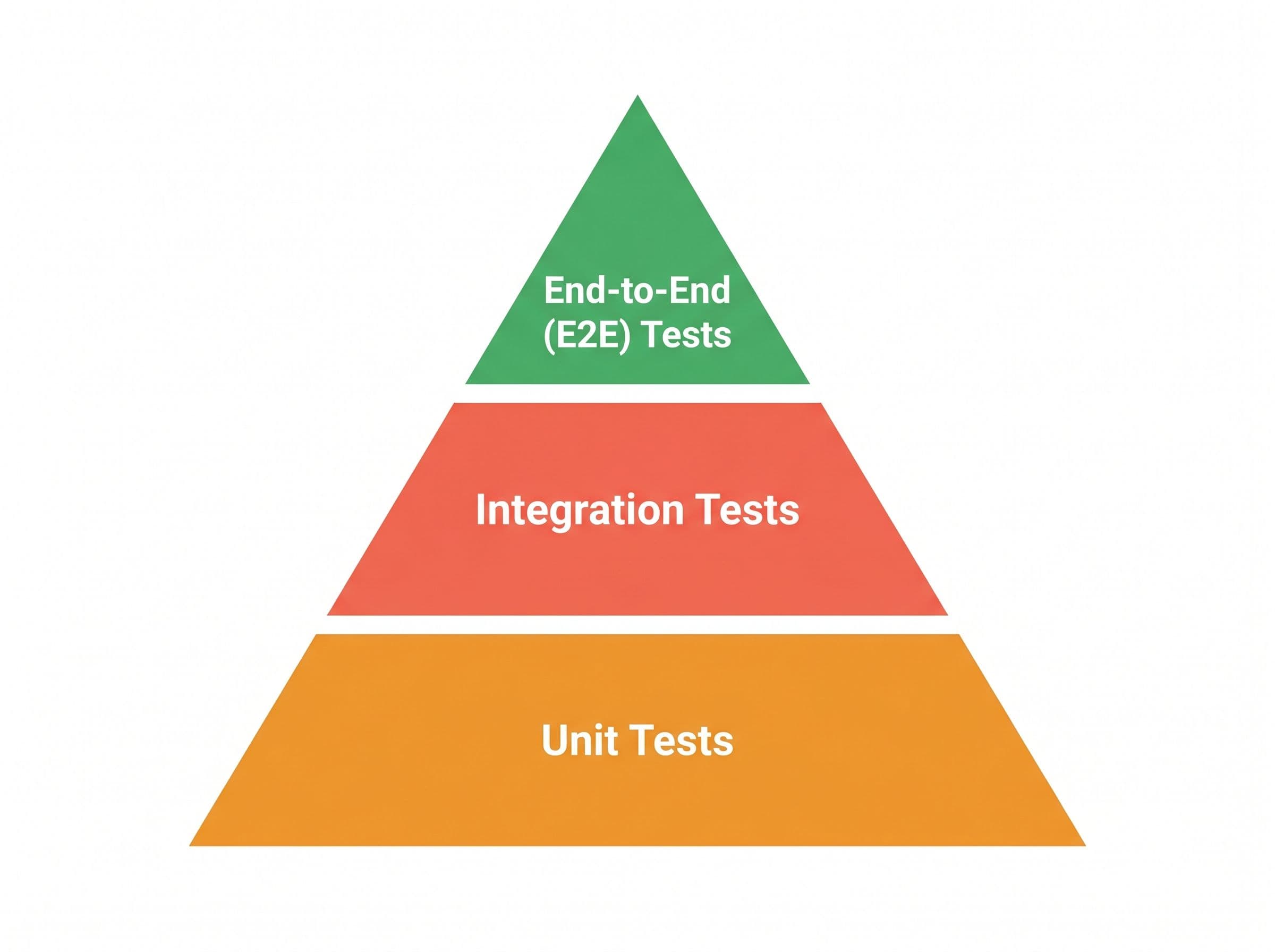
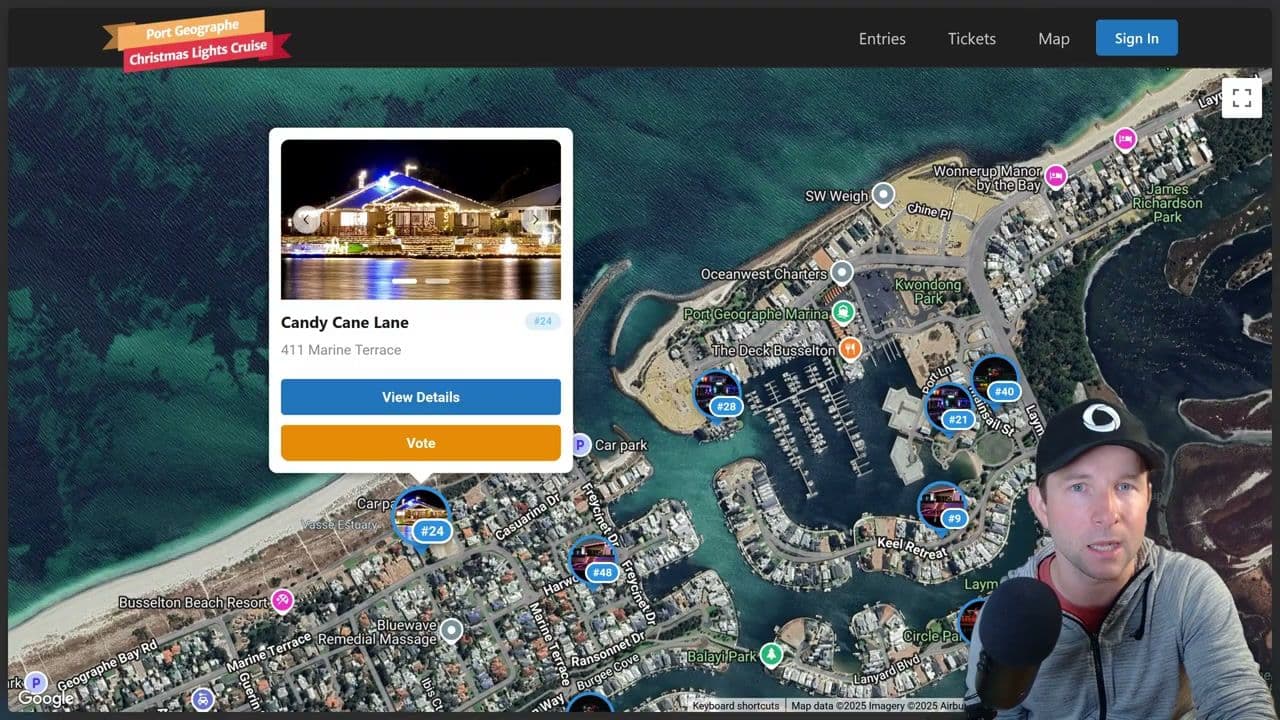
Writing end to end tests has traditionally been a bit of a pain in the bum. They depend on so many specific details about your app such as UI elements being in exact locations on the page or the page containing specific text or the route being structured exactly as it is now. But that's the thing, your app is a constant evolving thing and it's going to be changing as new requirements come in. This means your fragile end-to-end tests are going to need to change quite [music] frequently, which is not only frustrating for you, the developer, trust me, I've been there, but it's also a big waste of time. There's a reason why the famous testing pyramid [music] puts the end to end tests at the top and the much easier to maintain unit tests at the bottom. So, what often ends up happening is you end up with some crazy deadline that you need to meet and your tests aren't passing. So, you end up commenting out the test just so you can get your bill to pass and you get your deadline and get your feature out on time. And you you'll come back to to uncomment those tests when things settle down. Right. Right. And besides, that's what the QA department's for, right? Those guys should catch any issues that might crop up as a result of your changes. But what if your company is too small for a QA department or your app is so large that there's no way the QA guys are going to be able to test everything before each release? If only there was a way we could somehow access that self-directed intelligence of a human QA worker, but package it up into a box and have it run on the CI and every single commit. I think you can probably see where I'm going with this. Stage hand is a library from browser base that allows us to use natural language to control a browser. So you can see in this very nice little animation they have here that shows how you control the browser to open to a page and ask it to extract the price of the first cookie and ask it to add to the cart before completing the checkout process. This is super cool because nowhere in here am I specifying details such as the exact button ID or the DOM structure that's expected to exist. It's just a natural set of instructions that you would give any human to follow. So that's what we're going to look into in this video. We're going to go through how to get set up with stage hand and convex, how to use it in a real project, some tips and tricks that I learned along the way, and [music] how much all this is going to cost. Spoiler, it's less than you might think. And I'm also going to finish on some future work here. I personally think this is a really exciting and valuable use case for AI that you can get going with today and get some real productivity gains. [snorts] So, once you've dropped me a like and sub, let's get into it. Okay. To get started, you're going to need a Convex project of some sort. Um, well, actually, technically, you can use Stage Hand without Convex, of course, but for this video, we're going to use Convex. I won't go through all the steps of getting set up with a Convex project here. Just hop over to the docs and follow one of the quick start guides. Once you've done that, you can install your favorite testing library. Mine is currently Vest, and this will be the one I'll be using in this video. Okay, so I'll just pause here for now and just show you um the project that we're going to be building our end to end tests for. So this is a personal project that I have slowly been hacking away on over the course of a few evenings and weekends. It's a website built for uh my local community for their annual Christmas lights competition. So you can book tickets to go on a cruise boat that goes around the canals and checks out all their houses and their light displays. This website also manages a competition that's being run. So, you can see there's a few mock entries on the page here. If I click one, you can see in a carousel of the pictures for the competition entry. Um, if you click on this button down here or the map button at the top, you can view the entry on a map, which is quite nice. If I click another entry, then I can choose to view the entry, which opens up um the entry page, and I can choose to vote on it. So I can choose to vote in one of the two categories um if you are signed in. Speaking of being signed up, so um you can click here uh on my entry to enter the competition by filling out the various details like so. Once done, your entry enters a submitted state which then needs to be approved by the competition organizer um [music] from the admin page here. Obviously only certain users are going to get this admin privilege. Um, [music] not all users are going to get the chance to do this, but anyway, if I approve it, it should now show up on the map. [music] Now, I'll save you the technical details of how all this works under the hood. Uh, probably not relevant for this video, but if you are interested in me doing a video on the internals of this project specifically, then leave me a comment down below uh or a thumbs up on somebody else's, [music] as it's the best way, best signal that I have to know what to make next. Okay, so you now have a sense of what this project's all about. Let's have a look at writing some uh end to-end tests for it. [music] Okay, so the first thing you want to do is split your end toend [clears throat] tests from your unit tests because you're probably going to want to run these test these test categories independent of each other. You're not going to want to run end toend tests which take a lot longer at the same time as running your unit tests probably. [music] So there's a couple of ways of doing this, but I think this is the best way to do it um is to use Vest's projects feature. So we can do this by pulling out our current unit testing config into a separate project section like so. Now we have end to end project and a unit project uh which only includes certain test files and have specific test settings. Then you can just run one project with bunx v test run project unit [music] or end to end or whatever. It's pretty cool. Okay. So, as you may have noticed from the config, this project already has some uh existing unit tests that live inside the convex folder, shared in source directories. And this is generally the way that I like to write my unit tests. I like to have them live alongside the source code that they are testing. End to end tests though are a bit different as they're usually testing a much larger set of behaviors in the application. So I like to put them into their own separate folder uh that I've here called end to end or E2E sorry. Okay. So before we look at the actual tests, let's talk a little bit about the setup that you're going to need to do first. So let's take a quick look at the stage hand docs here. So as we talked about in the intro, stage hand is a framework that's going to allow us to use AI to automate the browser. To do that, it leverages the awesome Playright library. In fact, Stage Hand is built on top of Playright. And by the way, if you're not familiar with Playright um or others like Puppeteer or Selenium, they basically provide an API around the browser like Chrome, Firefox, Safari or whatever and allows you to easily call functions to navigate pages, get contents, take screenshots, [music] etc. Anyways, the point is for these to work, you need to obviously have a site URL to point at to be able to navigate around. And we could do this by pointing to our currently running local dev server that I'm using here um that we start when we do um bun rundev. But the problem is is that this web server is pointing [music] to our our uh development convex deployment. And the issue with that is that we want the test to be repeatable as possible. And so that means that each time we run this and between each test ideally we want to have a nice clean repeatable environment to work from. And so if I am developing this app here and my end to-end tests are running at the same time they're going to keep wiping my state that I'm developing with and they're going to mess up my environment variables and whatnot. So it's not a great experience. You kind of want to separate these two development environments. So instead, what we need really is to be able to we need a way to be able to spin up a convex backend dynamically that runs independent of our development uh environment. And then we also want to be able to run to spin up a new vit instance and then point that to our new temporary backend. So that's what we're going to do here with this setup E2E function. Let's just pop it open. And we can see at the top here we have this convex backend and a V front end and a stage [music] hand instance. Then down here we have uh a test before all function which is going to run before any test runs um in the suite. So the first thing it's going to do is it's going to init our convex back end. And if we just quickly open that we can see that it's going to work by downloading a copy of the standalone convex backend [music] binary. Did you know that convex is entirely open source by the way? Um and you can run it either from Docker container or as an entirely standalone self-contained binary file which is really nice. It's pretty cool if you ask me that you can get all this power of convex backend wrapped up into a a single binary file like this. Anyway, back to the code. We now have the binary downloaded. So, we can just boot it up on a random port. And also just note this super important bit here because we're starting up the the back end ourselves. We can pass it an arbitrary instance name and secret which we have uh I have a couple hardcoded up here but those mean that we can pass it an admin key which allows us to do adminy things on the back end such as changing environment variables or deploy code to it [music] and that's exactly what we're going to do here once it's up and running. We're going to deploy our code from our convex directory in our project to our testing instance here. Now just back up to our our setup function from before. So now that we have our convex back end running, we can take the URL that it gives us and pass it to our VIT front end instance to start up um with our convex back end. So now that we have our front end running as well, we can boot up our stage hand instance which is going to start playright. Open the browser and we're all good to go. You notice that I'm also doing a couple of things down here with private keys. This is the setup authentication system in the application which is convex or um but I'll talk more about that in a bit. Okay. So finally we can have a look at the actual tests. So firstly you'll notice that I've split them up into three distinct describe or distinct categories of tests. I want to test everything from the perspective of a public user. So that's one that's not logged in or authenticated. I also want to test on the perspective of a voter. So somebody just wants to come and vote on something. And I also want to test from the perspective [music] of somebody who wants to enter the competition. So a a competition entrance. I structured it like this because don't forget the purpose of end to end testing [music] is to test the highle behaviors of application and ultimately give you the developer the confidence that the system is working the way that [music] you intended to. So I want to ensure that for the various kinds of users that going to be using my application [music] that it's going the main ways of using the application is going to work as I intended to. But let's dive into this test a little bit more now. So let's have a look at the simplest case first for a non-authenticated or a public user. So let's have a quick look at the application first just to show you what it is that we're going to be testing [music] for here in this first test. So if I open up the application, I'm going to sign out to make sure that I'm a public user. And then I want to make sure that my visitors are going to be able to buy a ticket uh to go on the cruise from the from the first page. Now there's two ways you could do that. You could either click on this button from the top navbar up here or if I scroll down a little bit here, you can click on this big red button to go buy the tickets. Ticket buying, by the way, is handled by Eventbrite, which doesn't actually work on local hosts. It has to work on HTTPS. Hence why I get this error when I press the button. But here's what it looks like when it's running on an actual HTTPS domain. But for the purpose of this end to end tests, I'm happy if users can just navigate to the stickers page here. And um there's a button that they can press to open up that eventbrite model. I'm happy if I can test that that set series of steps working. Now if we hop back to the code, we're going to start by calling this go to function. And this is a special function that I'm exporting from the setup A2 function from before. If we quickly have a look at that, we can see it's just a simple wrapper around stage hands go to call, which is in turn going to call playright to navigate a URL. I wrote this wrapper just as a way to abstract away the prefixing of our our locally running V server and to pass [music] in a type safe route um that I'll show more in a little bit later in this video. Okay, so by this point we should be on our correct page and now we [music] can finally actually do the meat of our test. So we can tell the stage hand AI to act by clicking the book tickets now button. Then we ask AI to observe the page to find the buy tickets button. And we finally do our expect here to make sure that if this is not the case, then this test should fail. Okay, so pretty simple. Let's take it for a spin. So I could either run this uh test by using the command line like I showed you before. But if you install the test VS code extension, you get this very nice UI in your IDE. So you can just click here to execute the test. So we can see doing so is going to start up a browser on the homepage. It's going to navigate to the tickets page and then the browser is going to close and our test has succeeded. Huzzah. And you'll notice in the output panel here is a bunch of logging information and a little uh summary about the number of tokens and the estimated cost. I'll talk a little bit more about the cost um [music] in in later in this video. But all these log settings and everything is obviously configurable inside the setup function I have here. Notice I've got the verbose logging turned on and a custom logger written here as I felt like I wasn't getting quite enough information that I needed um while I was testing this. And you'll also note that this is really nice thing about playright here is that you can actually record a video of your run. Um I've got that turned on. So if I open up the the folder here, I can see there's a bunch of videos from various runs I've done before and I can click one to watch it. This is super useful if you ask me. um and very very useful if you run in a headless environment like on your CI server which we'll talk a little bit more about in a bit. Okay, so one test down. Let's have a look at another test now. So again, this one's for a public user. It tests that the user should be able to navigate to the entries [music] page and view the entries there. Now obviously if the database is empty, we're going to end up with a blank page like this. So to fix that, we have this handy client object that I've exported from the convex back end which allows us to call our create mock entries mutation here. If we just click into that, we can see that this is a testing mutation. So this is a custom mutation that I've defined up here. And if you want to learn more about how to do this, this is called um custom functions. You can check out the convex helpers library. Anyway, so this testing mutation is just a normal mutation except it doesn't allow calling it unless we have this is test environment variable set. But if it is set, then the handle is going to get called, which means that it's going to call this function here, which is basically just going to generate a bunch of random mock entries for us. But I'm not going to go over the details of that right now. It doesn't really matter. Let's head back into our test. So by this point in the test, we should have some entries created on the screen. So we should be able to ask stage hand uh to extract some data from the page. And the nice thing about this API is you can specify a zod schema that the result should take. So here I expect there to be an entries which is an array with an entry name and the entry number. Then after that I'm going to check the length of the array and it should indeed be nine because that's the number of mock entries we created up here. Okay, so that's about it. Let's take this for a spin. So again, we can watch it and the homepage loads. It navigates the entries page, which is empty to begin with, and then it's populated and then exits and our test passes. Super duper nice. Okay, so now we've seen the three main APIs of Stage Hand. Act enables Stage Hand to perform individual actions on a web page. Extract grabs structured data from a page. Observe allows you to turn any page into a checklist of reliable actions. And there is one final one here which we haven't looked at yet which is in my opinion potentially the most interesting one which is agent. This turns highle tasks into a fully autonomous browser workflow. So let's just take a quick look at that one. Now to begin with let's just have a look at what it would look like if we had been doing it the way we've been doing up till now as a series of individual steps. So, we're going to start out going to the homepage as usual. Then, we're going to sign in because voting requires that you are [music] authenticated. How this signin process works doesn't is not really important right now. We're going to have a look at that in a minute. Um, for now, just assume that this logs you in and returns the user object me here. Okay. So, now we need to an entry to vote on. So, let's create one here. Then let's shortcut things a bit by having the page jump to the dedicated entry page um that we're specifically interested testing in uh for this voting flow. By the way, this is kind of what I was talking about with the type safe routing. This is all thanks to the type route library. I really need to do a dedicated video on this library because I'm in love with it. Um but anyways, now that we're on the entries page, [music] we can click on the vote button and then uh vote for the best display. Then we can grab all the votes again using our custom testing query here that will only be available when running testing in the testing context. Then we should expect there to be exactly one vote and the voter should be me object and it should have been for that specific category. And now we can just give this a crack. You can see it opens the page goes to the home quickly signs in opens the entry page opens the vote modal and votes. Right. So there's quite a few manual steps involved in this process and [music] I guess you could argue that we're tying ourselves too closely to implementation going back to the way that we were doing things at end to end test before where we were again expecting things to be in certain places. [music] So let's imagine now of ourselves to be in the place of our users. When they land on the site they aren't going to know where everything is or how to get there. their only goal really is going to be I I want to vote on this entry with a [music] specific entry number. So that's what we can simulate here with this agent function. We can give it the very high level goal to vote for an entry with the number that we provided from the mocks that we created up uh up here. Then once again we can expect the vote to be in the correct category for the right entry. Also, just note here that I haven't told it that it needs to be able to log in to vote. It's up to the agent to work out how to do that or that it needs to do that just like a human user would would have to work this out. Okay, so let's take this for a spin. So, it's going to take quite a bit longer to run. So, I'm going to speed things up a little bit and as we watch it go to um the right page and then sign in and then go back to where it was before and then cast the vote. And huzzah, it works. So, this is super nice, right? As we aren't anymore tying our behavior to our implementation at all. It's almost as if we've been able to have a new fresh user test out our site with no prior knowledge. And another really nice benefit of this is that we get to watch the AI struggle as it navigates our page. And we get to read its thinking. And this is super valuable because it gives you fresh insight into what difficulties actual human users may very well encounter as they use your site as well. I actually experienced this myself in another agentic test down here that I have for entering competition. I asked the AI to work out how to enter the competition. I watched it as it navigated around the site. I saw that it would start off from the homepage here and then it would think about how do I enter the competition and it would click this entries button up here because that's the one that looked the most relevant and then it saw this big view competition details button at the top here and it click that and then it would get confused on here because there was no indication on this page here exactly how to enter the competition. So when I noticed that I was like ah I need to add a section at the top of the the page here so that gives a nice clear button um to enter the competition. So this kind of like user experience optimization is really cool because it wasn't really possible [music] prior to the invention of LLM outside of doing expensive and timeconuming user studies. Now, I have to admit that although it did run and succeed on this particular run, it's unfortunately not always the case that it always succeeds. And I think that maybe this is just the price you're going to have to pay for this non-deterministic AI having free reign over navigating around your app. It's just sometimes it's just going to go down another branch of possible possible ways of doing something and it's going to get stuck sometimes and not work out how to be able to solve the test. Now, I suspect there are ways that we could go about minimizing this um by prompting things a little bit more carefully or simply increasing the intelligence of the model, the size of the model that you're using actually. So, let's just talk about the the model stuff now. So, um I experimented with quite a few here as you can see from inside the setup E2E function. I really like the speed of the Gemini flashlight model and it is super duper cheap. Um, but as this eval graph that is on the stage hand site shows you, it's just a bit dumb and um, it would often kind of it would it would not always reliably get the result. So, right now I'm actually using the GBT5 mini model. I found that it's kind of the right sweet spot for me for like the really good intelligence and cheap price. As we can see from the run output from before, um that is actually cost us to do that one test considerably less than a cent to run, which in my opinion is pretty good for like an on demand QA department like this. So other than globally setting setting the model um that you want, you can actually change the model per agent or even per step if you want. I haven't experimented too much around with this yet, but I can imagine getting quite clever with this where you could get it to run using the dumb model to begin with and if it fails, maybe like progressively increase the intelligence until it passes. Okay, so this video is getting way too long, but I have two last topics that I want to cover before we wrap up, which is orth and CI. So as you saw before the AI is able to work out how to sign in itself and we're also able to do this program programmatically signin process. So now this application is using convex or to authenticate it users and I'm only using Google or as you can see from the signin page here. Now this is a problem for end to end tests because I don't want the AI to have to use Google account to every time it wants to sign in to be able to to run the test. it would be slow and problematic and probably Google will end up blocking me eventually. So instead when we start the V front end in our setup function, we pass in this vit is test mode flag. Then in our sign-in page, I do a check for that flag [music] and instead of rendering the normal page with the Google orth on it, I instead going to render this test or page. So this is that page that you may have briefly uh noticed earlier. This lets the AI pick a name, a username and sign in. Then on the convex side, we have this special testing credentials provider for the convex orth object. And we're going to make sure that it's only available when we're running in test mode. Then that provider is just basically just going to do the the dance that we need for convex or creating a new user, etc. And this works really well. The AI is now able to optionally sign in if it wants to. Sure, it's not exactly the same flow that the real human would take. Um but again testing is all about giving you the developer confidence that your your app is going to work the way you expect it to. So in my opinion it's a good compromise. Now the question is is I guess how would you do this for other or solutions on convex such as better or clerk web etc. Well that is a good question. I actually haven't done those yet. Uh so I'm not entirely sure but I suspect you'll be able to be able to do this kind of shortcutting flow no matter which solution you're using. But having said that, if you would like me to do see more information on this, leave me a comment down below and I will do a follow-up on it. Okay. So, the final thing I want to talk about now is running these tests on the CI because it's all well and good having these end to- end tests written, but if you aren't going to run them, then what's the point? So, I was a bit nervous going into this because I've had nightmares in the past trying to run um end to-end tests on a headless browser in CI environments. Um, but I have got to admit I was pleasantly surprised about how painless this was getting this all running. So here's the GitHub actions file that I used to make this all work. So first it checks out the code, installs bun, install the dependencies. Then I set up some caching for the playwright browser so that we don't have to redownload it every time we want to run these tests. Then we install the browser and run the tests. Now I'm going to have to pass in our uh keys here into the stage hand tests. I'm passing both the Open AI and the Google ones here as I was experimenting with both those kinds of models. And once these tests are done, it's going to upload the recorded videos to the artifacts. So, you can go and download them and re-watch them and um see what happened. Very nice. I really like being able to download the videos and watch them if if something didn't go quite as expected and try and debug it. By the way, if you don't want to mess around with all this CI stuff yourself, browserbased, the makers of Stageand, have a cloud offering which makes it super easy to run your tests on their cloud with realtime video feedback and all the other bells and whistles. So, if you don't want to go through all this headache yourself, go and check them out. Okay, so we're getting very close to finishing here. I just want to talk about one extra thing, which is the future of this work. I'm personally really bullish on the potential for this and I'm going to push internally to try and get my halfbaked setup that I've got going here turn into a really fully featured end to- end testing solution for convex. If you agree with me and think that this is something that we should spend some more time on, then drop me a comment down below as it will help justify the reason for spending more time on it. I think even if we can just make it a little bit easier to download and spin up a standalone convex back end without having to write so much messy code like I did it I did before then I think this will be a big help. Oh, and by the way, if you want to get access to all the code and everything that I've shown in the video, then I've left links to all of it down below. And just before I wrap up here, I want to leave you with one solid piece of advice I was given to by a good friend of mine and mentor Stray many years ago when I first started to learn testing. She said, "If it's worth manually testing something, then you might as well make it repeatable." And this has stuck with me ever since and has echoed in my head over the past year as vibe coding has taken off. Rather than continually manually testing the output from the AI over and over again, because who knows what might have broken this time around, you might as well make your manual tests repeatable by writing some end-to-end automated tests. And hopefully now with stage hand those end to-end tests that were so brittle before are hopefully much less of a pain and much easier to main maintain over time. And on that note, thanks for watching everyone. Until next time, cheerio.
I've spent years writing Playwright tests that pass on Monday and break on Wednesday because someone renamed a button. So when I sat down to add AI end-to-end testing to a Convex app, I tried something different: a natural-language browser agent, Stagehand, driving a real browser against an ephemeral Convex backend, orchestrated by Vitest. This article walks through what I built, what it cost, where it broke, and what an AI end-to-end testing setup looks like on a reactive backend.
Per-run isolated backends, type-safe routing, test-mode auth that bypasses OAuth, and full CI integration in GitHub Actions. Each test run costs less than a cent on the model I settled on.
Why traditional E2E tests break
AI end-to-end testing exists because selector-based E2E testing has a maintenance problem. Tests written against CSS classes, XPath, or data-testid attributes break whenever the UI is refactored, and the breakage is often unrelated to whether the feature still works for a human user. By the time a deadline approaches, many teams comment the brittle tests out and ship anyway.
The root issue is that selectors describe how the DOM is structured rather than what the user is trying to do. A button renamed from #buy-now to #purchase is functionally identical from a user's perspective, but it breaks every test that referenced the old id. The test suite isn't testing the feature, it's testing one snapshot of the implementation, which is why selector-heavy suites rot faster than the code they cover.
The testing-pyramid trap
The classic testing pyramid puts unit tests at the wide base, integration tests in the middle, and E2E tests at the narrow top. The shape exists because E2E tests are slow, flaky, and expensive to maintain, so you write as few as possible. That's reasonable advice given the cost, but it leaves the highest-value tests, the ones that actually exercise what a user does, perpetually underinvested. The uncomfortable compromise is that the tests closest to real user behaviour are the ones you end up shipping the fewest of.
What self-directed QA in a box would actually require
If I imagine the version of this I want, it's something close to a junior QA engineer who reads the feature, opens the app, tries the obvious paths, and reports back. That requires three things:
A browser the agent can drive
A way to express intent in natural language rather than selectors
A backend that can be reset to a known state per run.
Stagehand and Convex cover the first two and the third respectively, which is why those are the pieces I reached for.
What Stagehand is and why it pairs well with Convex
Stagehand is a Playwright-based library from Browserbase that lets you drive a browser using natural-language instructions interpreted by an LLM, with a small, explicit API surface rather than open-ended prompting. It pairs well with Convex because Convex runs as a standalone open-source binary, which means each test run can have its own clean backend instead of fighting over shared dev data.
The combination matters because most AI-driven browser tooling assumes the backend is a black box you can't reset. With Convex, the backend itself is part of the test fixture, so you can seed exactly the state a test needs and tear it all down at the end of the run.
Act, Extract, Observe, Agent: the four APIs
Stagehand exposes four primitives:
act() performs a single action described in natural language, like "click the buy button."
extract() pulls structured data out of the page using a schema you provide.
observe() asks the model what's on the page or whether a condition holds.
agent() hands a high-level goal to an autonomous loop that plans and executes its own steps.
The first three are deterministic enough to write assertions against, because the surface area is small and the model is doing one bounded thing per call. The fourth isn't, and I'll come back to that.
Why a reactive backend matters for repeatable tests
Convex queries are reactive, so any data a test mutates is immediately visible to the frontend without manual refresh logic. For E2E tests this matters because the model never has to "wait and retry" on stale UI: the moment a test-only mutation seeds a record, the page reflects it, and the agent can proceed. Selector-based suites spend a surprising amount of code on polling, sleeping, and waiting for hydration, and most of that disappears when the backend pushes updates to the client. Convex's durable workflows also mean that test mutations apply atomically, so there's never partial state between your setup step and the agent's first action.
Splitting unit and E2E tests with Vitest projects
Unit tests and E2E tests have different runtime characteristics, so I split them into two Vitest projects inside the same repo:
Unit tests run in milliseconds against pure functions
E2E tests boot a backend, launch a browser, and call an LLM
Mixing them in one config means every vitest run pays the E2E setup cost, which is the kind of small friction that quietly stops you from running tests during development.
Configuring two projects in one repo
In vitest.config.ts I define a projects array with two entries: one named unit that globs src/**/*.test.ts, and one named e2e that globs e2e/**/*.test.ts and includes the setup file that boots Convex and Stagehand. From the CLI:
1bunx vitest run --project unit
2bunx vitest run --project e2e
3
The VS Code Vitest extension picks both up and lets me run either side from the gutter, so the unit-test feedback loop stays as tight as it would be in a single-project setup.
Where to put E2E tests in a Convex codebase
I keep E2E tests in a top-level e2e/ directory, separate from convex/ and src/. The setup file lives at e2e/setupE2E.ts and is responsible for the lifecycle: download the Convex binary if needed, start it on a free port, deploy functions, launch Stagehand, and tear everything down after the suite. Keeping all of that in one file means the lifecycle is visible in one place, which matters when something goes wrong and you need to know which step failed.
Spinning up an isolated Convex backend per test run
The cleanest pattern I found is to run a fresh Convex backend per test run as a child process of the test suite, using the same standalone binary you'd use for self-hosting Convex. This gives each run a clean database, no shared state with the dev deployment, and parallelism-safety if you ever want to fan tests out across multiple workers.
Why the dev deployment isn't safe to test against
If tests hit your dev deployment, two things go wrong. Tests pollute the data you're using for manual development, so the UI you're poking at in another tab keeps changing under you, and concurrent test runs (in CI, on a teammate's machine, in a watch loop) clobber each other. Running against an ephemeral instance solves both problems and makes test runs reproducible because the starting state is always empty.
Downloading and booting the standalone Convex binary
The setup script downloads the Convex backend binary for the current platform on first run and caches it, so subsequent runs skip the download entirely. It then spawns the binary on an available port, pointing it at a temporary working directory so the SQLite file is throwaway. The script waits for the health endpoint to respond before continuing, since starting tests against a not-yet-listening backend produces the kind of confusing connection error that wastes an hour of debugging.
Deploying functions to the ephemeral instance
Once the binary is up, the script runs bunx convex deploy against the local URL with the ephemeral admin key, which pushes the schema and all functions in convex/ to the new instance. The frontend, started by Stagehand under Vite, is configured via VITE_CONVEX_URL to point at the same local backend, so the app the agent drives is the real app, talking to a real Convex instance, just one that didn't exist five seconds ago.
Writing the first test with a public-user smoke flow
The first test I wrote was a smoke test for the public ticket-purchase flow: open the homepage, navigate to the tickets page, click buy, and confirm the success state. Stagehand drove the whole thing in about a dozen lines, which is the first moment I started believing this approach could replace meaningful chunks of my old Playwright suite.
Type-safe routing with a goTo wrapper
The app uses type-route for routing, so I wrote a small goTo helper that takes a typed route object and navigates the Stagehand page to its URL. That keeps tests refactor-safe, because if a route's parameters change, the test fails at compile time instead of at runtime with a 404. The test reads almost like a sentence:
The route function is the one declared in the app, so the test and the app share a single source of truth for URLs. Renaming a route in the app produces a TypeScript error in the test, not a flaky failure three weeks later.
Using act and observe to assert behaviour
For the buy flow I called act("click the buy ticket button") and then observe("is there a success confirmation visible on the page?"). The observe call returns a structured boolean that I assert on. No selectors, no waits, no flakiness when a designer changes the button colour, and the test reads like a description of what the user is doing rather than a description of the DOM.
I stopped thinking about elements and started thinking about intents, which is the level the test should have been at the whole time.
Watching Playwright video recordings
Stagehand inherits Playwright's video recording, so I enabled it in the launch config and dropped the videos into test-results/. When a test fails, I watch the recording and see exactly what the agent saw, which is more useful than any stack trace I've ever had. A 12-second clip of the agent clicking the wrong tab tells me more in one viewing than half an hour of log archaeology used to.
Seeding data and extracting structured results with Zod
Most useful tests need preconditions: a tour to buy tickets for, votes already cast, a user with a specific role. I expose those preconditions through test-only Convex mutations, then use Stagehand's extract() with a Zod schema to assert on whatever the UI ends up showing.
Test-only mutations gated by an environment variable
I add functions like _testSeedTour to convex/_testing.ts and guard them with a runtime check on a IS_TEST environment variable set only on the ephemeral backend. If the variable is missing, the mutation throws. This pattern keeps the dangerous-by-default helpers from running in production, and the custom functions helpers make the guard a one-line wrapper that I apply uniformly to every test helper.
The naming convention (_test prefix) is a second line of defence. Even if someone managed to call a test mutation from the frontend in production, the function name is loud enough that it would surface in code review. The point isn't to make this impossible, just to make it implausible.
Asking Stagehand for a typed result set
For a test that needs to verify the leaderboard, I define a Zod schema for the row shape and call:
1const result =await page.extract({2 instruction:"extract the top five entries from the leaderboard",3 schema: z.object({4 entries: z.array(z.object({ name: z.string(), votes: z.number()})),5}),6});7
The result is typed, and I can run normal assertions on the array. No DOM traversal, no fragile text-content matching, no regex over innerText. The schema is the contract: if the page doesn't contain extractable data shaped like that, the call fails with a useful error rather than returning a half-parsed mess.
What's interesting about extract() is that it does roughly the same job as a custom DOM scraper, but I get to specify the output shape instead of the input shape, which is the whole point. The test says what it needs and the model figures out how to find it, which is exactly backwards from the selector-first approach and exactly right.
Going fully autonomous with the agent API
The agent API hands a single high-level goal to Stagehand and lets it plan its own steps, which is the part of this stack that feels like a genuine shift in what's possible. Instead of scripting "click X, then click Y, then verify Z," you tell the agent "vote for the boat with the most lights and confirm your vote was recorded," and it figures out the path.
From step-by-step to high-level goals
I rewrote a multi-step voting test as a single agent() call. The scripted version was 40 lines. The agent version was three. When it worked, it worked exactly the way a human tester would have, including handling a mid-flow confirmation dialog I hadn't anticipated. That last part is the surprising one: the scripted version would have failed on the dialog because I hadn't written the click for it, whereas the agent just dismissed it and kept going.
What watching the agent struggle reveals about UX
The interesting failure mode wasn't the agent breaking, it was the agent taking too long to find the obvious next step, which usually meant the UI was hiding it. In one run the agent couldn't figure out how to enter the competition because the CTA was buried below the fold and styled like body text. That's a UX bug, and the agent surfaced it before any user did.
I started watching agent traces the way I'd watch a user-testing session, looking for the moments of hesitation. Each pause was a small piece of evidence that something on the page was harder to find than it should have been. None of my selector-based tests had ever produced that signal, because selectors short-circuit exactly the discovery process that the signal lives in.
The non-determinism trade-off
The same agent call can take three different paths across three runs, and occasionally one of those paths fails for reasons that are hard to attribute. I haven't fully separated model issues from prompt issues from genuine UI ambiguity. For now I run agent-mode tests with retries and treat their failures as a signal to investigate rather than a hard build-break.
The honest framing is that agent-mode tests are a different kind of test, closer to monitoring than to assertions. A scripted test fails when the code is broken, but an agent test failing means something is off, which could be the code, the model, or the page, and the value is in the investigation rather than in the red dot itself.
Picking a model for cost versus reliability
Model choice is the biggest variable in this whole setup, both for reliability and for per-run cost. I tried several before settling on GPT-5 mini as the default, and the difference between models was larger than I expected going in.
What Gemini Flash, GPT-5 mini, and others cost per run
Gemini Flash is the cheapest option I tried and worked for simple act() calls, but it stumbled on multi-step flows and on extract() with non-trivial schemas. GPT-5 mini was reliable across the suite and came in at less than a cent per test run for the test sizes I was using. A frontier model would have been more reliable still but multiplied the per-run cost by an order of magnitude, which adds up fast in CI when every PR triggers a run.
If you're prototyping and want cheapest-possible, start with a small model. If you're running this in CI on every PR, the small-but-not-tiny tier is the sweet spot. If your tests must never flake and budget isn't the constraint, jump to the frontier tier and revisit the bill at the end of the month.
Per-step model overrides
Stagehand lets you override the model per call, so the long-term optimization is to use a cheap model for simple act() calls and reserve a stronger model for agent() and complex extract(). I haven't tuned this fully, but the API supports it and it's the obvious next lever. The mental model is the same as picking instance types in a cloud setup: don't pay for capability you don't need on the cheap parts of the workload.
Test-mode authentication with Convex Auth
For tests that need a signed-in user I added a test-only credentials provider to Convex Auth that accepts a username and returns a session, bypassing the production Google OAuth flow entirely. The provider is registered only when a VITE_IS_TEST_MODE flag is set, so it can't be reached from a production build.
Bypassing Google OAuth for tests
Driving a real OAuth flow from an agent is possible but brittle and slow, since Google actively detects and blocks automated sign-ins. A test-only provider sidesteps the problem by issuing a session for a known test user directly, which is faster, more reliable, and doesn't depend on Google's bot-detection mood that day.
A test-only credentials provider
In convex/auth.ts, when IS_TEST_MODE is true, I register a credentials provider that takes { username } and looks up or creates the corresponding user. The frontend, also gated on VITE_IS_TEST_MODE, renders a small "sign in as test user" form that the agent can interact with. This doesn't exactly mirror the production OAuth code path, which is the honest trade-off. I accept that gap because the alternative (driving real OAuth in CI) would cost more in flakiness than the coverage gap costs in confidence.
The provider isn't registered without the env var, and the UI isn't rendered without it, so two independent gates mean a single misconfiguration can't expose the test path in production.
Running AI E2E tests in GitHub Actions
The whole setup runs in GitHub Actions with one workflow file: checkout, install Bun, cache the Playwright browser download, run the E2E project, and upload videos on failure. The agent's API key is supplied as a repository secret, and the standalone Convex binary boots inside the runner just as it does on my laptop.
Playwright downloads Chromium on first install, which is slow in CI. Caching ~/.cache/ms-playwright keyed on the lockfile cuts cold-run time substantially and only invalidates when dependencies change, so the cache stays warm across most PRs and the cold-cache penalty hits only when someone touches the lockfile.
Uploading run videos as artifacts
The if: failure() upload is the single best debugging feature in this whole setup. When a test fails on CI, I download the artifact, watch the agent's session, and almost always see the cause within seconds. No log archaeology required, no guessing at what state the page was in when the assertion blew up. The video shows the agent hovering over the wrong element, or the page rendering an unexpected modal, or the network tab silently failing, and the fix is usually obvious from there.
Limitations and honest trade-offs
This is an early-stage approach, and there are things it doesn't do well yet. I want to be specific about them rather than wave them away.
When agents get stuck
The agent occasionally fixates on a wrong interpretation of the page and burns tokens trying variations of the same failed action. I've capped step counts to bound the cost, but a confused agent still produces a test that's slow and uninformative. The fallback is to break that test back down into scripted act() calls, which is annoying but recovers the determinism I gave up by going autonomous in the first place.
There's also a subtler failure mode where the agent succeeds for the wrong reason, like clicking a different button that happens to produce a success-looking page. I've only seen this once, but it's the kind of false-pass that's worse than a false-fail because it doesn't show up until something downstream breaks. Schema-typed extract() assertions after the agent call are a partial defence: they make the test verify the actual outcome rather than just "did anything succeed-looking happen."
What this approach doesn't replace
This isn't a replacement for unit tests, contract tests on Convex functions, scheduled function validation, or hand-written Playwright tests for flows where determinism matters more than expressive intent. The right shape, in my experience, is to use scripted Playwright (or scripted Stagehand act()) for the critical-path flows you must never let regress, and use agent() for exploratory coverage and UX-smell detection. I expect this balance will shift as models improve, but it's where I'd start today.
The other thing it doesn't replace is taste. Watching an agent run through your app is a useful design review tool because it exposes the parts that are hard to navigate, but it can't tell you whether the feature is the right feature or whether the copy lands. Those are still human judgements, just now informed by a slightly weirder set of data points than before.
Frequently asked questions
Q: What is AI end-to-end testing? A: AI end-to-end testing means driving a real browser against your app using natural-language instructions interpreted by an LLM, rather than CSS or XPath selectors. A library like Stagehand exposes primitives (act, extract, observe, agent) that translate intent into browser actions, so tests describe what a user does instead of how the DOM is structured.
Q: How much does it cost to run AI E2E tests? A: On the test suite described above, using GPT-5 mini, a single test run cost less than a cent. Costs scale with the number of model calls per test, the model tier, and how much page content the model has to reason over, so an agent()-heavy suite on a frontier model can be substantially more expensive.
Q: Can AI E2E tests replace traditional Playwright tests entirely? A: Not yet. Scripted tests are still more deterministic and cheaper to run, so they remain the right choice for critical paths you can't afford to have flake. AI-driven tests complement them by covering flows that change often and by surfacing UX problems through agent behaviour.
Q: How do you handle login in AI E2E tests? A: Add a test-only credentials provider to Convex Auth that's only registered when a test-mode environment flag is set, then have the agent sign in through a simple test-mode form instead of the production OAuth flow. This avoids the brittleness of driving real OAuth in automation.
Q: Does this work in CI? A: Yes. A standard GitHub Actions workflow can install Bun, cache the Playwright browser, boot the standalone Convex backend, run the Vitest E2E project, and upload run videos as artifacts on failure.
Q: Is Convex open source? A: Yes, the Convex backend is available as a standalone binary and as a container, which is what makes it practical to spin up an ephemeral, fully isolated backend per test run.
Where this approach goes next
AI end-to-end testing on a Convex stack is workable today for exploratory coverage, smoke tests, and UX-smell detection, and the per-run cost is low enough that I'd run it on every PR. The honest gap is non-determinism at the agent() layer, which I expect to narrow as models and the Stagehand API mature.
If you want to try this on your own project, the working example, including the Vitest setup, ephemeral backend boot, test-mode auth, and the GitHub Actions workflow, is on GitHub at mikecann/port-geo-christmas-lights-cruise at the video-release tag, and a fresh project can be bootstrapped from the Convex quickstart.
If you're using Convex's Agent component for AI workflows in your app, the same ephemeral backend pattern lets you test those flows end-to-end without touching production threads or message history. If you've built something similar or want Convex to invest in a first-class E2E testing story, I'd like to hear about it
All gas, no breakages
Convex is the reactive backend platform that keeps up with you and your agents. Database, functions, workflow, sync, search, file storage, and more. All TypeScript, zero glue.